Red Tide: A Calendar-Invite Worm That Spreads Mailbox to Mailbox
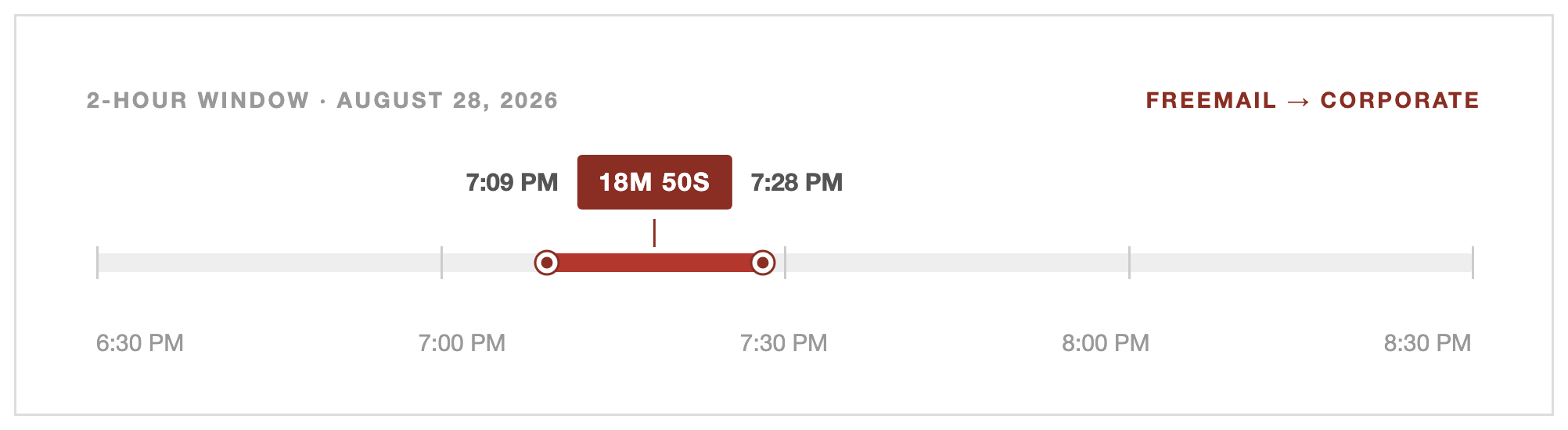
A phishing campaign that spreads itself: in one confirmed case, a personal Gmail account picked up the lure, and nineteen minutes later a different mailbox at the same company was sending it onward.
Written by
Seido Karasaki
Published on
September 23, 2026
Part 2 of Red Tide: Our first piece on this campaign covered the malware-delivery branch, a browser-assembled dropper sent from a pool of close to two hundred compromised mailboxes. This piece follows the credential-harvesting branch hanging off the same front-door infrastructure: a lookalike Google sign-in. Of the fleet-wide crawls that resolved past the shared CAPTCHA gate, 86% led here and 14% led to the malware branch.
A meeting that adds itself
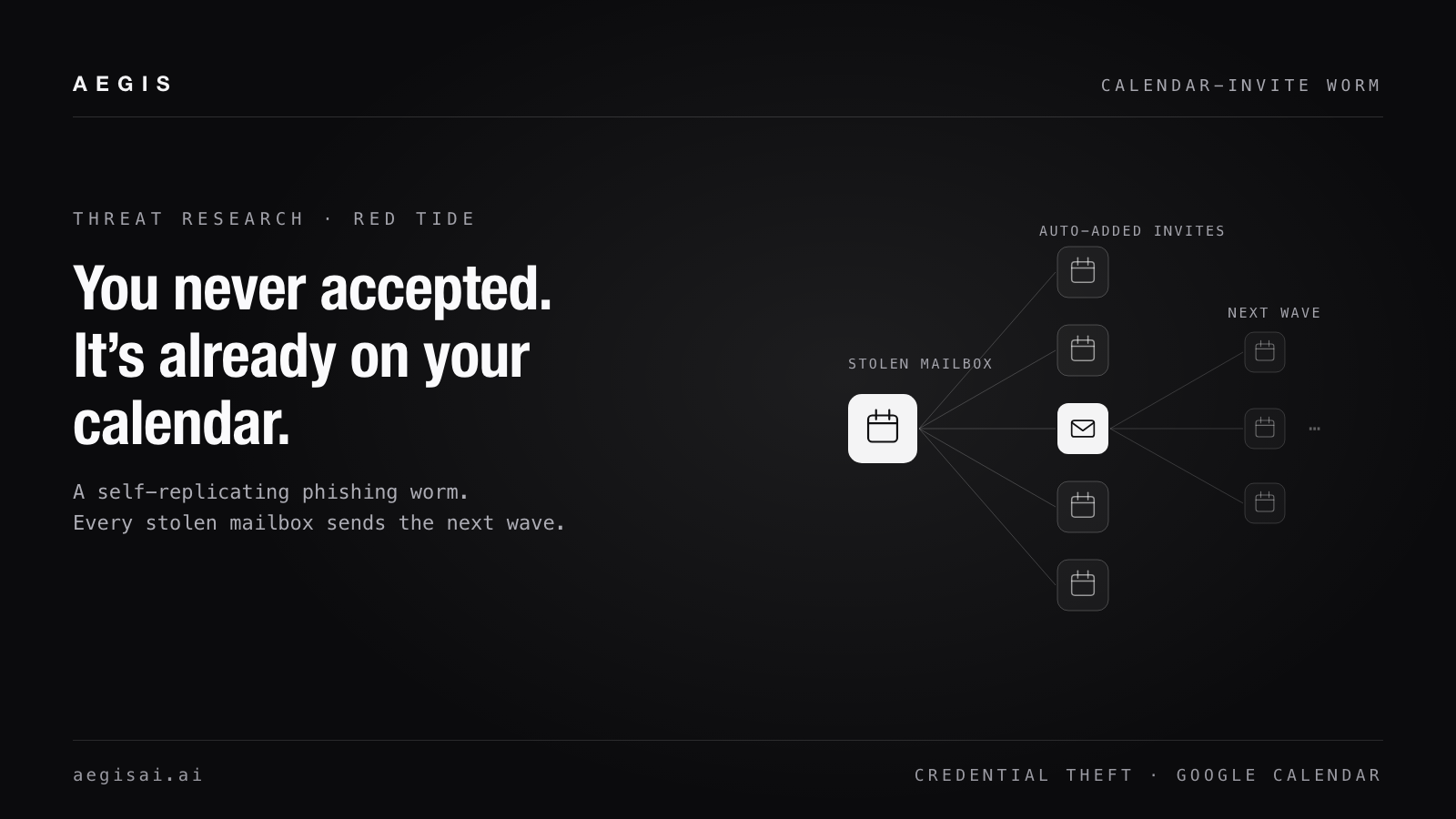
A self-replicating phishing kit rides Google's real calendar infrastructure onto a schedule with no click required, harvests credentials behind a lookalike Google sign-in, and turns every mailbox it compromises into the trusted origin of the next wave.
THE FASTEST CONFIRMED REPLICATION: UNDER 19 MINUTES, FREE MAIL TO CORPORATE
August 28, 2026. Both messages were independently identified as phishing, sent from two different mailboxes using two different pretexts.
We're calling this campaign, the malware branch from Part 1 and the credential branch covered here alike, Red Tide, for how it spreads: not by an operator hand-picking new targets, but by one compromised mailbox becoming the water the next infection blooms in. Every message in this campaign arrives the same way: as a genuine Google Calendar invitation, generated by Google's own infrastructure on behalf of a real Workspace account, sent because that account's owner unknowingly clicked something in an earlier wave. Google Workspace creates the calendar entry automatically the moment a METHOD:REQUEST invitation is delivered, no click, no accept, no acknowledgment. A phishing email has to survive one moment of the recipient's attention. An invitation skips that moment entirely: it is already on the calendar, waiting to resurface at reminder time, by the time anyone would have been suspicious of it. That is what makes the campaign self-sustaining rather than a one-shot send: each wave only needs its sender's account to still be compromised, not its recipient to do anything at all. The one lever that changes this by default belongs to the administrator, not the recipient: Google Workspace can require invitations to come from a known sender before auto-adding them, a control covered in the recommendations below.
The self-replication mechanism itself isn't new to us: our TIDAGUEST report from July documented the same compromised-inbox-becomes-sender pattern, behind a different lure and on unrelated infrastructure. The broader shift to calendar-invite delivery isn't isolated to what we've tracked, either: other security vendors didn't start reporting the same rise in calendar-based attacks until weeks after we did.
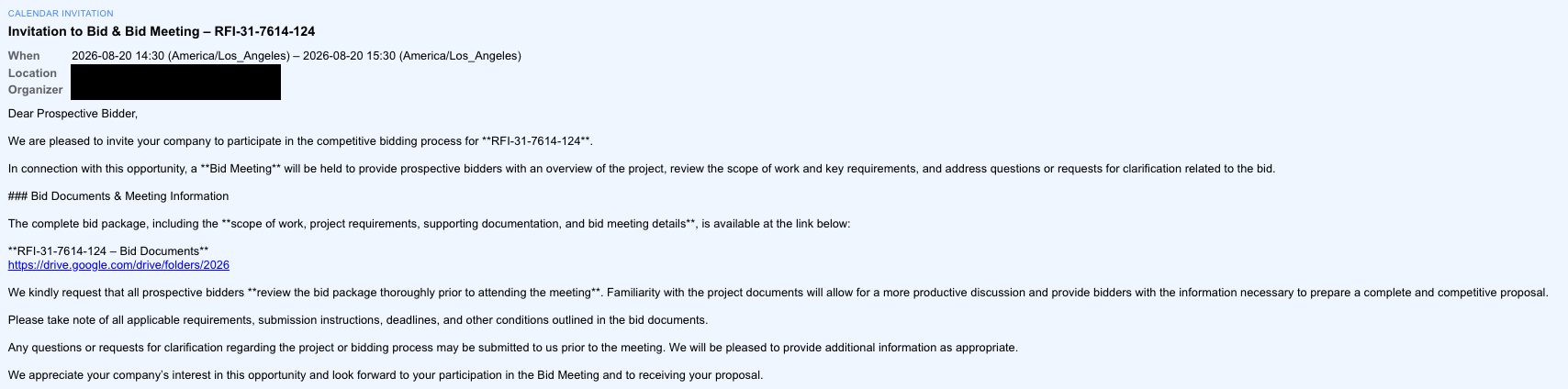
Figure 1. A campaign invitation as the recipient sees it. Organizer and location are redacted; the bid-documents link points at a Google Drive folder, and the RFI number recurs across the rest of this cluster.
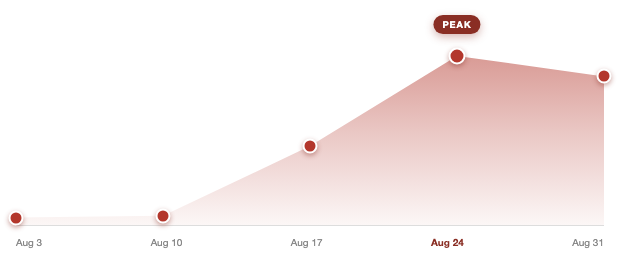
The volume tells its own story. Near zero through the first two weeks of August, the cluster rises sharply the week of August 17, roughly doubles again to its peak the following week, and is still running three weeks later at the time of writing. Two details in the subject lines point at Google's own defenses reacting in real time as the campaign ran: about 10% of messages carry Google's own “Invitation from an unknown sender:” prefix, meaning Google flagged the sender as unrecognized and created the calendar event anyway, and roughly 8% are “Canceled event” notifications, meaning the operator rescheduled or pulled invitations after the fact, generating a second wave of no-click calendar churn from the same infrastructure.
WEEKLY MESSAGE VOLUME IN THIS CLUSTER, RELATIVE TO PEAK
Still active as of September 13, the date of this analysis.
KEY JUDGMENTS
This kit is a worm, not a fixed target list, and we can trace the spread directly: in one confirmed case a personal Gmail account's calendar invite reached a corporate mailbox, and a different mailbox at that company was phishing under the same campaign 19 minutes later. At another protected tenant, Aegis's account-takeover detection caught a real compromise the same day it happened, from account behavior alone, the kind of signal an organization without it simply doesn't have.
The lure needs no click to land: a Google Calendar invitation writes itself onto the calendar the moment it's delivered, no accept, no interaction at all. That is what lets each wave propagate, since reaching the next sender depends only on an account staying compromised, not on anyone's attention.
At least 58.5% of the organizations we protect were reached, sent from a broad pool of mailbox domains, 42.7% of them used only once, under a dozen fictional bid, invoice-collection, and voicemail pretexts.
Confirmed activity runs from August 4 through September 13, 2026, the date of this analysis, and this phishkit was still active and sending as of then.
Credential harvesting runs behind at least six attacker-registered domains built to mimic Google's own accounts.google.com, fronted by a CAPTCHA-style human-verification gate designed to blind automated analysis. Our own crawl-path signals fingerprint that cloaking technique even when they can't get past it, and on at least one occasion did.
Two-thirds of a high-confidence sample from this campaign was identified and labeled phishing automatically, caught independently by domain recall rules, cross-cluster signal matching, and a vision-model landing-page classifier.
The worm mechanic: victims become senders
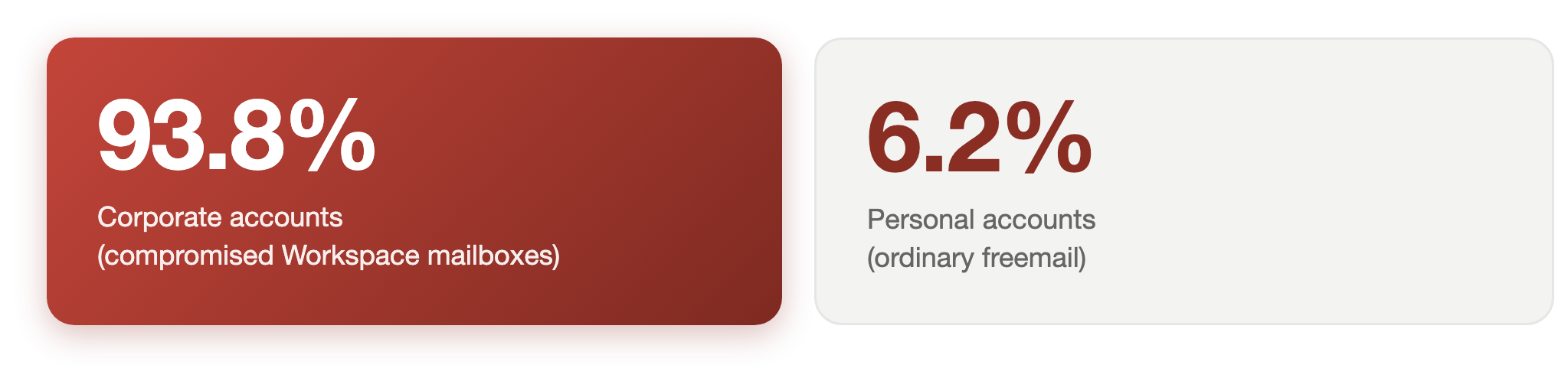
The sender pool itself explains why this campaign never runs out of targets: it grows out of its own victims, and it doesn't stay confined to one kind of account.
THE SENDER POOL CROSSES SOCIAL AND PROFESSIONAL LINES
Cross-referencing those freemail-sent messages against the campaign's own later senders shows the crossing runs in both directions: a corporate address that received one of these freemail-sent lures, and a different address at that same domain going on to send the campaign's phishing itself, in some cases within a single day. Because our visibility only extends to organizations we protect, this is very likely an undercount of how often the same pattern plays out in mailboxes we never see.
Beyond the aggregate, we can also show the mechanism directly, with the tightest confirmed example we found, charted at the top of this piece: cross-referencing this campaign's full sending pool against the organizations we protect that appear as recipients turns up a match precise enough to rule out coincidence. A personal Gmail account's calendar invitation reached a corporate mailbox; 19 minutes later, a different mailbox at that same company began sending phishing under this same campaign, a different pretext entirely, confirmed independently as phishing on both ends. It mirrors what we found on the malware side in Part 1, a compromised mailbox that had itself been a target days earlier going on to send the next wave, and it is likely one case among many playing out in mailboxes we can't see at all.
Mechanistically, this is straightforward: gaining persistent, API-level access to a mailbox, the kind that survives a password reset rather than just a stolen password, is exactly what would let a compromised account start sending on the attacker's behalf without its real owner ever noticing, whether that account started out personal or corporate. A compromised account holding that kind of access is fully equipped to become the next wave's trusted, DKIM-signed origin, which is exactly the role this campaign's real sending pool plays.
One kit, many pretexts
The subject lines in this cluster normalize down to about 130 distinct templates, but a handful dominate: “Invitation to Bid - Project Documents & Bid Meeting” (16% of the cluster), variants of “start your proposal” (13%, including a run of typo'd re-sends), “Invitation to Participate in Bidding Process” (8%), “Review Before the Deadline” (5%), a bid-RFI variant carrying a fabricated reference number (7%), and smaller runs built around invoice collections, credit-note review, and one built as “[IMPORTANT] Meeting with voicemail attached.”
The fabricated reference number is worth calling out on its own: the string RFI-31-7614-124 recurs across about 13% of the messages in this cluster, across senders with no business relationship to each other or to the recipients. Unrelated small businesses do not independently invent the same request-for-information number; its recurrence is the clearest evidence that one kit, not a genre of copycat phishing, is behind all of it.
The redirect infrastructure tells the same story. A recurring set of gate domains shows up across sender after sender in this cluster: world-invitedocument[.]com, documentsview[.]top, facilitiesolution[.]com, securebidd[.]com, securebidroom[.]com, and several more, all serving the same role regardless of which fictional bid or invoice is naming them in that day's subject line. A subset of this same domain family also fronts a related malware-delivery chain we've documented separately; here we're following only the credential-harvesting branch that hangs off the same front door.
The credential page behind the gate
Every gate in this cluster presents the same obstacle to automated analysis: a CAPTCHA-style human-verification challenge, styled variously as a “Security checkpoint,” “Human verification,” or “Verify you're human” screen. Our own crawl-path signals recognize the technique itself as the tell: one signal flags a CAPTCHA challenge that renders no real content behind it, firing on roughly 12% of this cluster's crawled URLs, and two more, tuned to obfuscated JavaScript packing and to the specific Cloudflare-beacon-style verification widget used here, each fire on close to 4% of them.
What the gate is built to look like it leads to: at least six attacker-registered domains prefixed accounts., the same naming convention Google uses for accounts.google.com, sitting on freshly-registered hosting rather than Google's own infrastructure: accounts.ffzwi[.]icu, accounts.rprci[.]icu, accounts.jamszt[.]icu, accounts.jectpro[.]icu, accounts.osatins[.]icu, and accounts.hesperia-usd[.]click. Our own vision-model landing-page classifier independently flagged 43% of the URLs it crawled in this cluster as credential-theft pages, based on the content of the page alone, in its own words:
“The email subject references a specific financial document (Credit Note) and a meeting, but the linked page is a generic 'Security checkpoint' CAPTCHA. This is a classic decoy or cloaking technique used to bypass email filters or delay the user before redirecting them to a malicious credential harvesting site. The mismatch between the email's content and the landing page is a strong indicator of a phishing attempt.”
“The email claims to be an invitation from a specific sender but links to a generic 'Verify you're human' CAPTCHA page. This is a classic phishing tactic where the link is cloaked or redirected to a decoy page to bypass email filters or hide the true destination.”
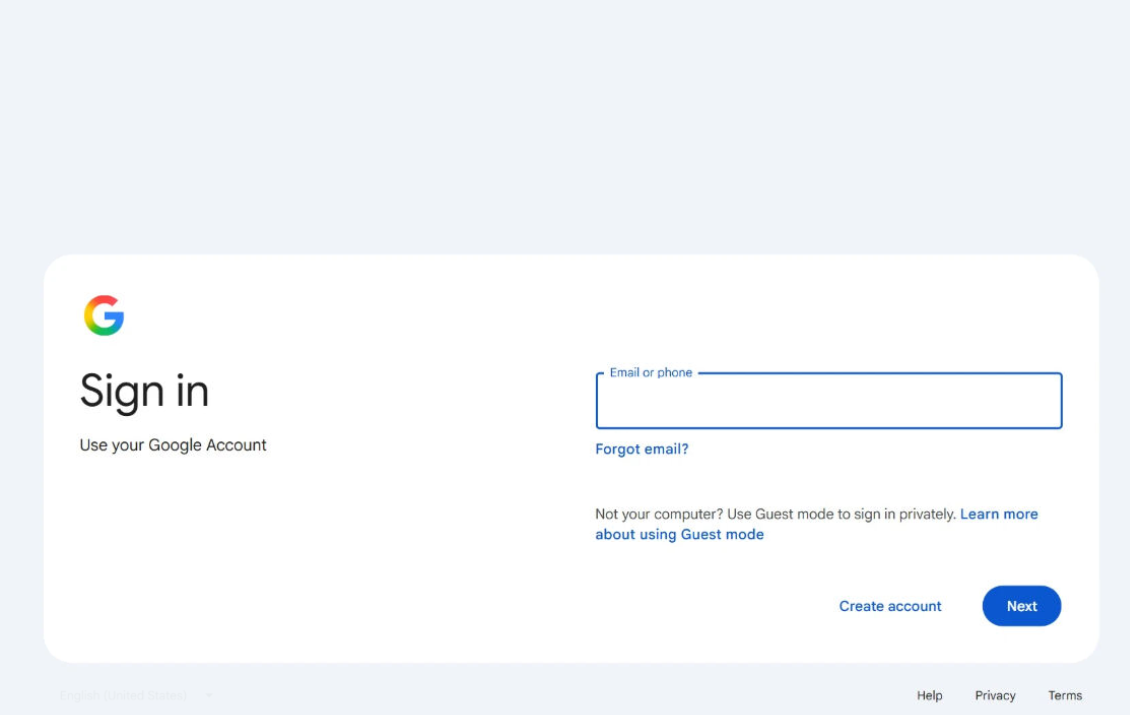
The crawls that cleared the gate confirmed what it is built to hide: a fully rendered Google sign-in page, styled after the real thing, sitting on infrastructure that isn't Google's.
Figure 2. The rendered credential page our crawlers captured behind the gate: a Google sign-in form on attacker-registered infrastructure, not Google's own.
Why standard controls miss it
Control
What it sees
Result
Domain / sender reputation
A real Google Workspace account, DKIM-signed as google.com, with no prior bad history
Bypassed
Attachment / malware scanning
No attachment; the entire payload is a link inside a calendar description
Not applicable
Email quarantine / secure email gateway
Removes the message from the inbox; the calendar event it already created is a separate object, untouched by quarantining the email
Bypassed
User vigilance / “don’t click unknown links”
The calendar entry is created automatically; there is no click for a user to decline
Bypassed
Automated URL crawling / sandboxing
A single-use CAPTCHA-style gate that returns nothing to a repeat or automated visitor
Bypassed
New/unlisted domain heuristics
Six-plus fresh domains, none with enough history to have a reputation yet
Bypassed
How Aegis protects against it
No single control in the table above catches this campaign, which is exactly why Aegis doesn't rely on any one of them. Aegis protects at every stage: blocked at delivery, before a recipient ever sees the invitation; blocked at the click, before a human-verification gate can hide where it leads; and caught in use, if credentials are stolen anyway and the compromised account starts behaving like one.
Step 1: DeliveryCalendar invite arrivesReal Google infrastructure, DKIM-signed, auto-added to the calendar
Step 2: The gateCAPTCHA-style challengeBlinds ordinary crawlers before the credential page loads
Step 3: The accountCredentials stolenThe mailbox becomes the next wave’s trusted origin
Aegis: EmailBlocked at deliveryMultiple independent detection layers evaluate and label it before it’s ever read
Aegis: Landing pageBlocked at the clickAutomated analysis recognizes the evasion technique and independently evaluates the destination
Aegis: IdentityCaught in useAccount-behavior monitoring flags the compromise even when credentials are stolen anyway
The gate is built specifically to defeat Step 2's ordinary crawlers. Aegis holds all three points independently, so the campaign has to survive every layer rather than the weakest one.
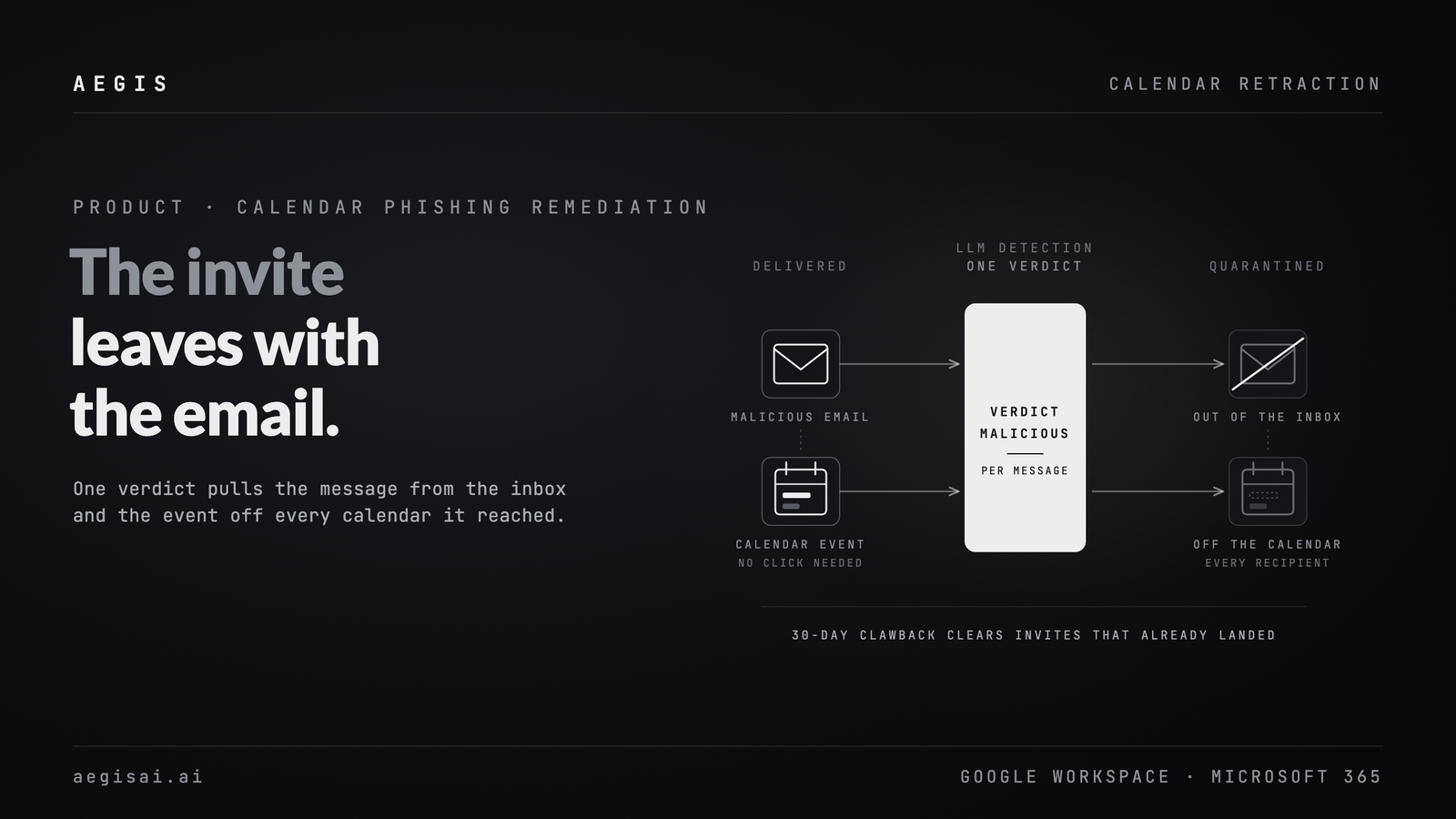
Quarantining the email isn't enough on its own for a lure like this: the calendar event it created is a separate object that survives the message being quarantined. Aegis removes that entry too, deleting the auto-created event from every calendar it reached and snapshotting it first, so a false positive can be restored intact.
The third layer matters most for a campaign built like this one, because it doesn't depend on catching the email at all. At another organization we protect (in monitor-only mode at the time), hit by this same campaign, Aegis's account-takeover detection identified a real compromise the same day it happened, purely from the account's own sign-in and mailbox behavior. None of it depended on the phishing email itself being caught; it depended entirely on recognizing that the account was no longer acting like its real owner. An organization without that layer has no equivalent signal, and a compromised account like this one can keep spreading damage, including new waves of this campaign, for weeks before anything else catches it.
Inbox rules created post-compromise to suppress campaign mail from the real owner’s view
T1070.008
Indicator Removal: Clear Mailbox Data
Sent-mail purges removing evidence of onward sending from the compromised mailbox
T1586.002
Compromise Accounts: Email Accounts
Each newly compromised mailbox becomes the sending infrastructure for the next wave
Recommendations for defenders
Restrict who can auto-add events to your calendars. In Google Workspace, the domain-wide setting is under Apps > Google Workspace > Calendar > Advanced Settings, “Add invitations to Calendar.” Moving it from “Invitations from everyone” to “Invitations from known senders” closes the largest part of this attack surface in one change, though it isn't a complete fix on its own: a compromised mailbox that has exchanged even one prior message with a target counts as “known.”
Don't trust DKIM as a proxy for sender trustworthiness. Every message in this campaign passes DKIM as google.com, because Google Calendar genuinely generated it on behalf of a real, compromised account. Authentication proves who sent a message, not whether the account is still under its real owner's control.
Monitor for the account-takeover pattern, not just the phishing email. A new-location sign-in followed within minutes by a sent-mail purge, followed within hours by high-risk OAuth application grants, is a recognizable compromise signature independent of whatever phishing email started it. Alert on high-risk OAuth grants specifically; they're the step that survives a password reset.
Treat a recurring fictional reference number or gate domain as a cluster key, not a one-off. The same fabricated RFI number and gate domains recur across unrelated senders in this campaign; a rule keyed on either one catches every sender using it, not just the first one you happen to see.
Indicators of compromise
Observed in our own telemetry through September 13, 2026. Attacker-registered infrastructure in this kit family churns quickly; treat this as historical rather than a live blocklist.
Indicator
Type
Notes
accounts.ffzwi[.]icu
Domain
Lookalike-Google credential domain; most frequently observed of the six
accounts.rprci[.]icu
Domain
Lookalike-Google credential domain
accounts.jamszt[.]icu
Domain
Lookalike-Google credential domain
accounts.jectpro[.]icu
Domain
Lookalike-Google credential domain
accounts.osatins[.]icu
Domain
Lookalike-Google credential domain
accounts.hesperia-usd[.]click
Domain
Lookalike-Google credential domain
world-invitedocument[.]com
Domain
Shared front-door gate; also fronts a related malware-delivery branch of this kit family
documentsview[.]top
Domain
Gate domain
facilitiesolution[.]com
Domain
Gate domain
securebidd[.]com
Domain
Gate domain
securebidroom[.]com
Domain
Gate domain
world-documents[.]com
Domain
Gate domain
world-access-invitdocument[.]com
Domain
Gate domain
document-invitation[.]com
Domain
Gate domain
RFI-31-7614-124
Campaign string
Fabricated reference number recurring across unrelated senders
Don’t Miss the Next Big Threat
Subscribe today to receive updates on the newest cyberattacks, product innovations, and best practices for protecting your organization.
The Inbox Has a Second Reader: Prompt Injection in Gemini and Copilot
Attackers hide instructions in email that Gemini and Copilot read and that people cannot see. How email prompt injection works, and how Aegis catches it.
How to Replace a Secure Email Gateway Without Breaking Mail Flow
Replace your secure email gateway with no MX change. A parallel-run migration plan: pilot design, stakeholder buy-in, and the metrics that prove it worked.
Calendar Phishing Remediation: The Invite Moves With the Email
Native calendar controls let most malicious invites land. AegisAI treats the invite as part of the email, so quarantining the message removes the event too.