Technical Guides
How to Evaluate API Based Email Security: MX Records, Mail Flow, and SIEM
A practical framework for evaluating API based email security: what to ask about MX record changes, mail flow impact, and SIEM and fraud tool integration.


Most email security evaluations start in the wrong place. Buyers compare detection rates, read analyst reports, and schedule vendor demos. What they rarely do is stress-test the three questions that determine whether a solution actually fits their environment: does it require touching MX records, what does it do to mail flow in production, and how does it plug into the monitoring infrastructure they already run?
These are operational questions, not marketing questions. The answers separate solutions that work cleanly in your environment from those that create new risk while solving an old one.
This guide gives security and IT leaders a practical framework for running that evaluation before committing to a platform.
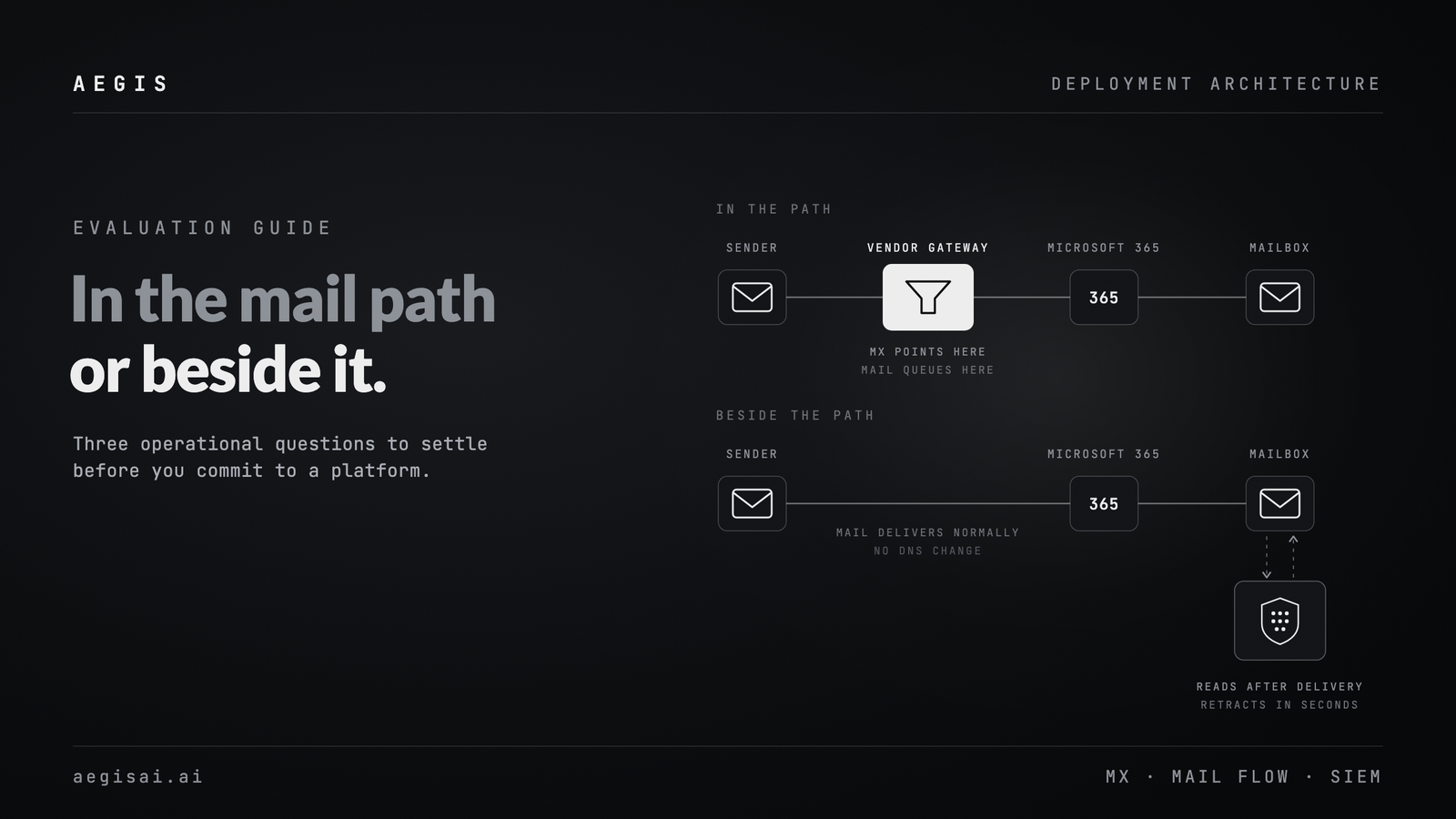
Email security vendors sort into two camps, and the distinction is not about AI features or threat intelligence feeds. It is about where in the mail path they sit.
Gateway-based solutions require you to route inbound mail through the vendor's infrastructure. That means changing your MX records to point at the vendor before mail reaches your environment. Detection happens in transit.
API-based email security connects directly to your mail platform (Microsoft 365 or Google Workspace) through native APIs. Mail routes normally. The platform scans messages after delivery, using the same access your helpdesk or compliance tools already use.
The deployment model affects every other evaluation criterion. Before you assess detection capability, you need to know which model you are actually buying.
Yes. A gateway has to receive your mail before your mail platform does, and the only way to make that happen is to point your MX records at the vendor. Vendors sometimes describe this as optional or phased, but the architecture eventually requires it. An API-based platform requires no MX change at all, because it never receives mail in transit.
So start there, with a direct question: does this solution require an MX record change at any point, including during proof-of-concept, initial deployment, or future feature expansion? Then ask what happens if you never change MX records. If the answer is that you lose protection against inbound threats, it is a gateway product regardless of how it is marketed.
A genuine API-based solution requires no MX record changes, ever. Deployment happens through an OAuth connection or admin consent to your mail platform. Your DNS records stay exactly as they are.
For organizations with complex DNS environments, compliance constraints, or multi-domain setups, that matters more than it sounds. A DNS change means a change window, a rollback plan, and sign-off from whoever owns the zone. Skipping it removes an entire workstream from the project.
Questions worth asking during an evaluation:
A vendor that cannot answer these with clear, unambiguous no answers is a gateway product in API packaging.
AegisAI connects entirely through the Microsoft 365 and Google Workspace APIs. No MX record change is required, not for the trial, not for full deployment, not ever. Removal is a single OAuth revocation. This is not a deployment option; it is the only way the platform works. The architecture is covered in more detail on our inbound email security page.
When a gateway scans mail in transit, every delivery passes through a third-party system before reaching your users. That introduces three categories of operational risk most buyers underestimate during evaluation.
Latency. Mail queues at the vendor's infrastructure for scanning. Under normal conditions this is milliseconds. During a vendor incident, a major threat campaign, or a regional outage, it becomes minutes or hours. Where email is operationally critical, that is a business risk.
Deliverability dependency. Your mail now depends on the vendor's uptime, not just your mail platform's. A gateway outage can stop inbound mail entirely, regardless of whether your Microsoft 365 or Google Workspace tenant is fully operational.
False positive consequence. When a gateway blocks or quarantines a message, that action happens before the message reaches your environment. Retrieval requires the vendor's release workflow, not a native admin console. For teams managing false positive volume at scale, that adds friction to every single release.
Do not accept a vendor's latency claim without testing it. During a proof of concept, instrument the actual mail flow with timestamp logging at delivery. Measure the delta between message transmission and inbox arrival across a representative sample of message types, including large attachments, encrypted messages, and high-volume internal threads.
Ask for the documented SLA for scanning latency. Ask for the historical uptime record for the scanning infrastructure, not the admin console. Ask what happens to mail delivery if their scanning infrastructure experiences an outage. The answer should be that mail delivers normally. If mail queues or bounces during a vendor outage, that is a single point of failure you are introducing into your environment.
An API-based solution that scans post-delivery removes all three risks. Mail delivery is handled entirely by Microsoft or Google. The security platform connects after the fact. A vendor outage means the security platform is unavailable; it does not mean mail stops flowing.
The trade-off gateway vendors will raise is that post-delivery scanning means a threat lands in the mailbox before it is remediated. That is a real consideration, and the right response is to evaluate remediation speed rather than accept mail flow risk as the price of pre-delivery scanning. A well-designed API-based platform retracts a delivered message from every mailbox in seconds, before users see or click it.
Questions worth asking:
AegisAI operates entirely outside the mail delivery path. Microsoft 365 and Google Workspace handle delivery; AegisAI connects via API to scan, classify, and remediate. Automated quarantine and retraction execute within seconds of a threat being identified, before users see or click the message.
Security teams frequently treat integration as a phase-two problem. During the initial evaluation they focus on the detection console the vendor provides. Integration becomes a priority after purchase, when they discover the vendor's data model does not map cleanly to their SIEM schema, or that the webhook payload omits the fields their fraud team actually needs.
Building integration quality into the evaluation prevents that.
A mature API-based platform treats SIEM as a primary output channel, not a reporting export. That means:
Real-time event streaming. Threat detection events should be available as a webhook or native SIEM connector within seconds of detection. Scheduled log exports that run every 15 or 30 minutes are not SIEM integration; they are log archiving.
Normalized field mapping. The event payload should map cleanly to common SIEM schemas (CEF, LEEF, or a documented JSON schema) so the security team does not need to write transformation logic for every event type.
Bidirectional capability. A well-integrated platform accepts response actions from the SIEM. If an analyst identifies a threat through a correlated event in the SIEM, they should be able to trigger remediation from inside that workflow rather than pivoting to a second console.
Threat context in the event. The detection event itself should carry enough context for triage without a follow-up query to the vendor's console: sender reputation data, URL categorization, attachment hashes, and similar signals embedded in the payload.
Email-borne fraud (business email compromise, vendor invoice fraud, and impersonation attacks) is a different use case from malware detection. Fraud monitoring teams care about signals that do not always trip a traditional security alert: reply-to header anomalies, look-alike sender domains, unusual payment or credential request language, and lateral movement inside an email thread.
When evaluating fraud monitoring integration, ask:
Our breakdown of BEC attack prevention covers the signal types in more depth.
Use this as a structured part of your proof of concept:
AegisAI exposes real-time detection events through webhook and native SIEM connectors, with payloads that include the full threat classification, affected recipients, sender analysis, and the remediation action taken. BEC and fraud-specific signals are distinct event types, not collapsed into a generic phishing category. Role-based alerting lets finance and fraud operations teams receive targeted signals without routing everything through the SOC queue. Because AegisAI operates through the mail platform API, it also sees internal mail flow, which means thread-level anomaly detection for mid-conversation compromise works by default.
Structure your proof of concept in three phases that mirror the questions above.
Connect the platform to your mail environment. Confirm no DNS changes are required. Measure baseline inbox delivery timing to establish a pre-integration baseline. Validate that removal is clean and reversible.
Introduce known threat samples from your threat intelligence feed or red team. Measure detection speed, remediation speed, and false positive rate on internal mail. Document the remediation workflow for your helpdesk. Confirm that a vendor outage scenario does not affect mail delivery.
Connect to your SIEM and fraud monitoring tools. Validate event fidelity, latency, and field mapping. Test bidirectional actions if applicable. Brief your fraud operations team and gather feedback on signal quality.
Score each vendor against these phases before comparing detection marketing claims. A platform that deploys without touching DNS, does not affect mail delivery, and integrates cleanly with your monitoring stack has passed the operational test. Detection capability is a meaningful differentiator only after those fundamentals are confirmed.
Most email security RFPs include a section on detection rates and threat coverage. Very few include a section on what happens when the vendor has an incident.
Ask every vendor you evaluate: in the last 12 months, have you had a service disruption that affected customer mail delivery or security coverage? How long did it last? How were customers notified? What changed afterward?
A gateway vendor with an outage in its history may have briefly stopped mail delivery for its customers. An API-based vendor with an outage left mail delivery untouched. That asymmetry follows directly from where in the mail path a solution sits.
Build the question into your evaluation. The answer, and the way a vendor gives it, tells you more about operational maturity than any detection benchmark.
AegisAI is an API-based email security platform for Microsoft 365 and Google Workspace. Deployment requires no MX record changes. Book a demo to walk through your environment and run a proof of concept against your own evaluation criteria.