All Posts
Technical Guides
Email Security

DMARC Rollout Without Breaking Mail: p=none → quarantine → reject

Master the DMARC Transition: A Risk-Free Path to Full Email Enforcement in Google Workspace + Microsoft 365

Written by
Vito Prasad
Published on
February 17, 2026

Want the exact click-by-click hardening checklist for Microsoft 365 email security and Google Workspace? Start with the master guide

While a standard spam filter for Office 365 or Gmail catches "noisy" junk, DMARC is a critical pillar of enterprise email security. It is one of the few controls that can reliably reduce spoofing at scale, though it requires careful preparation to avoid delivery failures.

This post serves as a practical rollout playbook for AI-powered email security. We cover what “alignment” actually means, how to stage enforcement, and how to inventory third-party senders to ensure your corporate email security remains intact.

This guide is designed for admins and security teams managing enterprise-grade AI phishing scam prevention across Exchange Online and Google Workspace.

What DMARC does (and what it does not)

DMARC answers two questions:

  1. Should the receiver trust the domain shown to users in the From header?
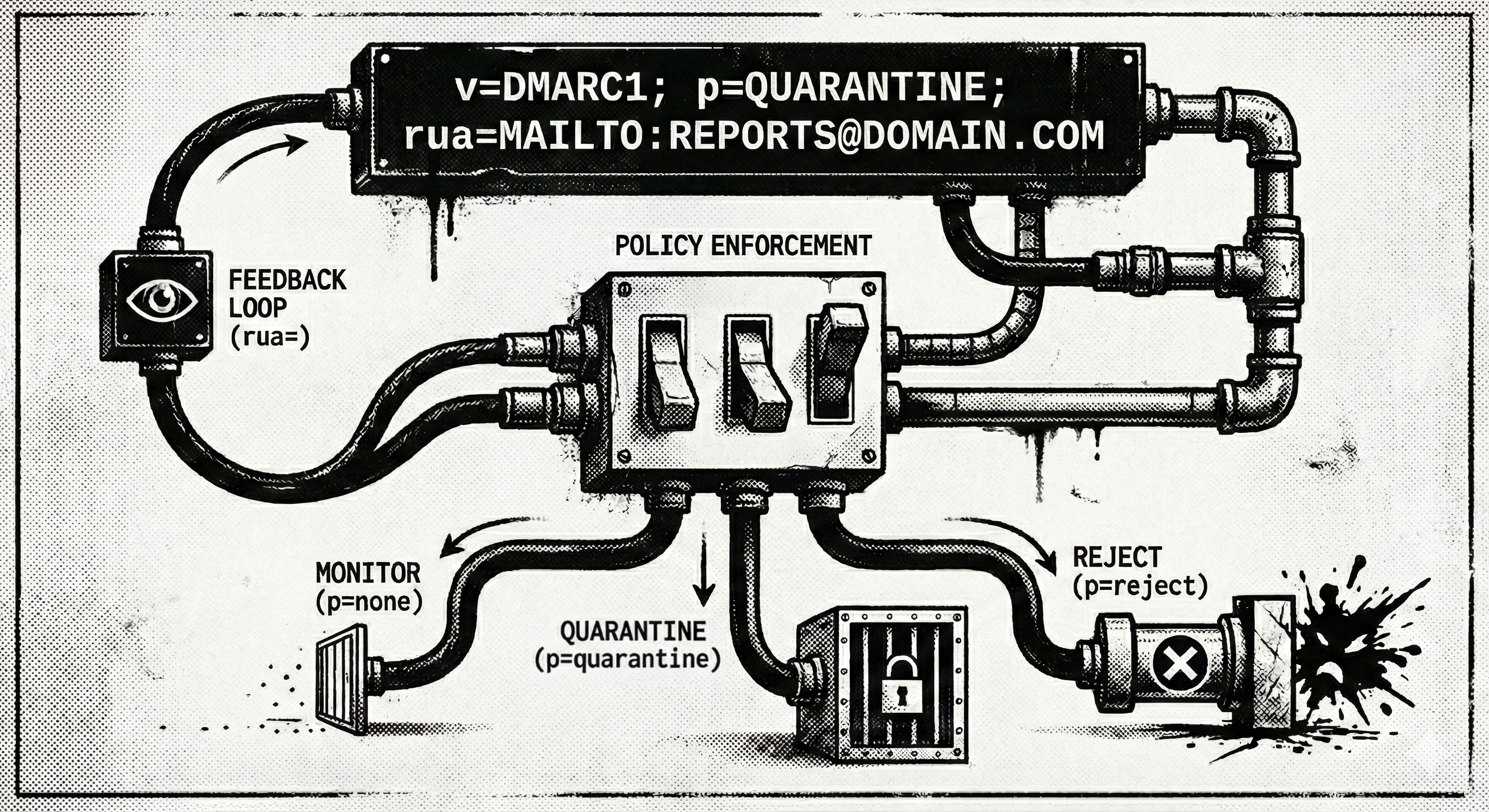
  2. If authentication fails, what should the receiver do? (monitor, quarantine, reject)

DMARC does not stop:

  • Compromised vendor mailboxes sending “legit” mail from a real domain
  • Business Email Compromise from a lookalike domain (example: acme-payments.com)
  • Internal account takeover

DMARC is still worth it because it closes a large class of spoofing and impersonation attempts that are otherwise hard to police consistently.

Prerequisites (do these before you touch p=quarantine)

You are ready to roll out DMARC when:

  • SPF exists for each sending domain (and you know who is allowed to send)
  • DKIM is enabled for each sending domain (and ideally stable)
  • You have a place to receive DMARC aggregate reports (RUA)
  • You have an owner for exceptions and third‑party senders (marketing, support, invoicing, HR tools)

If your org uses many SaaS senders, don’t skip the “third‑party inventory” step. That is where most DMARC rollouts fail.

DMARC in plain English: alignment

DMARC is not “SPF pass” or “DKIM pass.”

DMARC is “SPF or DKIM passes and the authenticated domain aligns with the From domain users see.”

Alignment is about domains matching:

  • SPF alignment: the domain that passed SPF (the envelope/mail-from domain) aligns with the visible From domain
  • DKIM alignment: the domain in the DKIM signature (d=) aligns with the visible From domain

Relaxed vs strict alignment

  • Relaxed (recommended for most orgs): subdomain alignment is allowed
    Example: From example.com can align with mail.example.com
  • Strict: must match exactly
    Example: From example.com must align only with example.com

Most rollouts start with relaxed (adkim=r; aspf=r).

Your rollout sequence (the safe path)

A common pattern that works:

  1. p=none (monitor only)
  2. p=quarantine with a small percentage (pct=10 → 25 → 50 → 100)
  3. p=reject with a small percentage (pct=10 → 25 → 50 → 100)

You can move fast if you have good visibility into your senders. You move slow if you do not.

DMARC record examples (copy/paste templates)

DMARC records live at:

_dmarc.example.com   TXT   "v=DMARC1; ..."

1) Start: monitor only

v=DMARC1; p=none; rua=mailto:[email protected]; fo=1; adkim=r; aspf=r; sp=none

Notes:

  • rua= is the mailbox that receives aggregate reports
  • fo=1 asks for failure reports when available (some senders/receivers ignore it)
  • sp= sets policy for subdomains (keep it none until you know what subdomains send mail)

2) Stage enforcement: quarantine with percentage

v=DMARC1; p=quarantine; pct=25; rua=mailto:[email protected]; adkim=r; aspf=r; sp=none

3) Full enforcement: reject

v=DMARC1; p=reject; rua=mailto:[email protected]; adkim=r; aspf=r; sp=quarantine

Subdomain policy (sp=) is optional. Set it only when you have a good inventory of subdomain senders (marketing, billing, support).

Third‑party sender inventory (the step people skip)

Make a short list of everything that can send mail “as you.”

Common categories:

  • Marketing automation (newsletters, campaigns)
  • Support/ticketing
  • Invoicing/billing
  • HR/payroll
  • CRM
  • Document signing
  • Recruiting tools
  • Security tooling that sends alerts using your domain

For each sender, capture:

  • From domain used (exact)
  • Whether they support DKIM signing with your domain
  • Whether they require a special Return-Path or SPF include
  • Whether they can use a dedicated subdomain (often the cleanest approach)

A safe pattern that reduces future pain

Use subdomains for high-volume third‑party senders:

  • marketing.example.com
  • billing.example.com
  • support.example.com

Then publish separate SPF/DKIM/DMARC for those subdomains and keep your corporate domain (example.com) cleaner.

Platform specifics

1. Microsoft 365 (Exchange Online)

SPF for Microsoft 365

Most orgs use:

v=spf1 include:spf.protection.outlook.com -all

If you have other senders, add them intentionally, and watch the 10‑lookup limit.

DKIM in Microsoft 365

Enable DKIM for each custom domain in the Microsoft 365 security/admin experience. (Exact navigation changes over time, but the flow is: pick domain → enable DKIM → publish CNAMEs → verify.)

Verification

  • Send a test email to an external mailbox and inspect headers:
    • Confirm there is a DKIM-Signature: header
    • Confirm the d= domain matches your From domain (or your aligned subdomain)

DMARC publishing

Publish the DMARC TXT record at _dmarc.<domain> in your DNS.

Verification

  • Use nslookup -type=TXT _dmarc.example.com (or your preferred DNS checker)
  • Then send test mail and confirm DMARC results in headers:
    • Look for Authentication-Results: lines that include dmarc=pass or dmarc=fail

2. Google Workspace (Gmail)

SPF for Google Workspace

Common baseline:

v=spf1 include:_spf.google.com -all

Add other senders intentionally.

DKIM in Google Workspace

Admin console → Gmail → Authenticate email (DKIM). Generate a selector, publish the TXT key, then start authentication.

Verification

  • Send a test email and confirm DKIM-Signature exists
  • Confirm the d= domain aligns with the visible From domain

DMARC publishing

Same rule: publish _dmarc.<domain> in DNS.

Common failure modes (and how to fix them)

1) “We turned on quarantine and marketing mail vanished”

Cause: the marketing platform is sending with your From domain, but:

  • DKIM is not signing with your domain, or
  • SPF is not aligned, or
  • the platform uses a different return-path domain that does not align

Fix options:

  • Configure the platform to use DKIM signing for your domain
  • Move the platform to a dedicated subdomain
  • Only after that: raise pct or policy

2) Shared domains and “on behalf of” behavior

If you send mail through partners, resellers, or shared infrastructure, you may see SPF/DKIM passing for a domain that does not align with the From domain.

Fix:

  • Require DKIM signing with your domain (or a dedicated subdomain)
  • Reduce “send as” workflows from shared infrastructure where feasible

3) Subdomains you forgot existed

You set sp=reject and suddenly a legacy system using alerts.example.com breaks.

Fix:

  • Inventory subdomain senders before enforcing sp=
  • Publish DMARC records for critical subdomains explicitly

4) Forwarding and mailing lists

Forwarding can break SPF, and mailing lists can modify content and break DKIM.

Fix:

  • Favor DKIM alignment for important sender domains
  • If you are dealing with complex forwarding chains, consider ARC (separate deep dive)

“First 7 days” checklist (practical)

Day 0

  • Publish DMARC with p=none
  • Confirm DNS is correct

Days 1 to 2

  • Pick one owner for DMARC triage (security + whoever owns outbound tooling)
  • Review top sending sources and look for:
    • High volume sources that fail alignment
    • Unknown sources claiming to be you

Days 3 to 5

  • Fix the top 2 to 3 legitimate sources failing alignment
  • Decide whether to introduce subdomains for vendors that refuse to align cleanly

Days 6 to 7

  • Move to p=quarantine with pct=10 to 25 for the primary corporate domain
  • Communicate what will happen to impacted teams (marketing, billing, support)

What “done” looks like

You can call DMARC “done” when:

  • The domains you care about (corporate + critical subdomains) have DMARC at p=reject (or at least quarantine if you are risk‑balancing)
  • Legitimate mail sources align cleanly (DKIM preferred)
  • You have an owner + process for new vendors that want to “send as you”
  • You can prove DMARC is enforced via external header checks and your reporting tool of choice

Verify it is working

Use this section to prove DMARC is active and not breaking legitimate mail.

1) Confirm the DNS record is published

Run a TXT lookup for your DMARC record:

_dmarc.example.com

You should see exactly one TXT record with v=DMARC1.

2) Send a controlled test email and check headers

Send from your domain to an external mailbox you control (a personal Gmail works).

In the full headers, find Authentication-Results and confirm:

  • spf=pass or spf=fail (either is fine)
  • dkim=pass for your domain (preferred)
  • dmarc=pass and it references your visible From domain

If you see dmarc=fail, check alignment:

  • If SPF passed but DMARC failed, SPF likely passed for a different domain (misaligned return-path)
  • If DKIM failed, content may be modified in transit (footers, gateways, list processing)

3) Validate staged enforcement behavior

If you are using pct=10 or pct=25, send 10 to 20 test messages with a simulated failure case (example: a third-party sender that is known to misalign). You should see only a portion enforced.

4) Confirm you can explain your top failures

Within 48 to 72 hours of p=none, you should be able to answer:

  • What are our top legitimate mail sources that fail DMARC today?
  • Which ones can be fixed with DKIM alignment vs moved to a subdomain?
  • Which failures are unknown and should be investigated as spoofing?

5) Decide your "done" bar

For most orgs:

  • Corporate domain at p=reject
  • Critical subdomains either have their own DMARC policy, or sp= is set intentionally

FAQ

Should we start with strict alignment?

Usually no. Start with relaxed (adkim=r; aspf=r) unless you have a tight sending inventory and a strong reason to enforce strict matches.

Do we need DKIM if SPF is already passing?

In practice, yes. SPF breaks under forwarding. DKIM gives you a more stable way to satisfy DMARC alignment for important domains.

Can DMARC stop Business Email Compromise?

DMARC helps with spoofing and some impersonation. It does not stop a compromised mailbox or a lookalike domain. Treat DMARC as a baseline control, not the full solution.

What is the safest way to handle third-party senders?

Use a dedicated subdomain per sender category (marketing, billing, support), then publish separate SPF, DKIM, and DMARC for that subdomain.

When should we move from quarantine to reject?

When your legitimate senders align consistently and you have an exceptions process. Many teams run p=quarantine for a short period at pct=100, then move to p=reject.

What about subdomain policy (sp=)?

Keep sp=none until you know which subdomains send mail. Only enforce sp=quarantine or sp=reject after you inventory subdomain senders and publish explicit policies where needed.

How does forwarding affect DMARC?

Forwarding often breaks SPF. DKIM alignment is usually the more reliable path. If you have complex forwarding chains, consider ARC (separate deep dive).
Don’t Miss the Next Big Threat
Subscribe today to receive updates on the newest cyberattacks, product innovations, and best practices for protecting your organization.

Subscribe

Success! We’ll be in touch soon.
Something went wrong while submitting.
Related topic articles
Read All Articles
IEH credential phishing attack path: an impersonated email passes reputation, attachment, and signature filters with no match, reaches a counterfeit Microsoft login page, and ends in a compromised Microsoft 365 mailbox.
Threat Research
Email Security
Credential Phishing With No Payload: Inside the IEH Microsoft 365 Mailbox Breach
A credential phishing email with no malware opened a Microsoft 365 mailbox at IEH Corporation, a U.S. defense supplier. How the account takeover worked.
Threat Research
Email Security
Kali365: How a Device-Code Phishing Kit Defeated MFA Without Breaking It
A $250-a-month phishing kit turned a legitimate Microsoft sign-in feature into a way to steal Microsoft 365 access without a password, a credential form, or a single attacker-owned domain, then staged its own shutdown and kept running under a new name.
AegisAI AI-native email security for Microsoft 365 or Google Workspace
Email Security
AI
Cloud Email Security: Microsoft 365 & Google Workspace
AegisAI is API-native cloud email security for Microsoft 365 and Google Workspace. Stop the phishing, BEC, and account takeover that native filters miss.