A single employee clicked a link that looked like a routine document share. That click gave an attacker access to a Microsoft 365 mailbox at IEH Corporation, a U.S. defense manufacturer whose connectors go into satellites, fighter jets, radar systems, and the THAAD and Patriot missile programs. IEH discovered the breach on August 4, 2026, and disclosed it to the SEC in an 8-K filing. The mailbox held customer communications, purchase orders, engineering documents, and potentially export-controlled technical data.
For security leaders, the notable detail is not the target. It is how little the attack required.
The credential phishing email carried nothing for legacy filters to catch
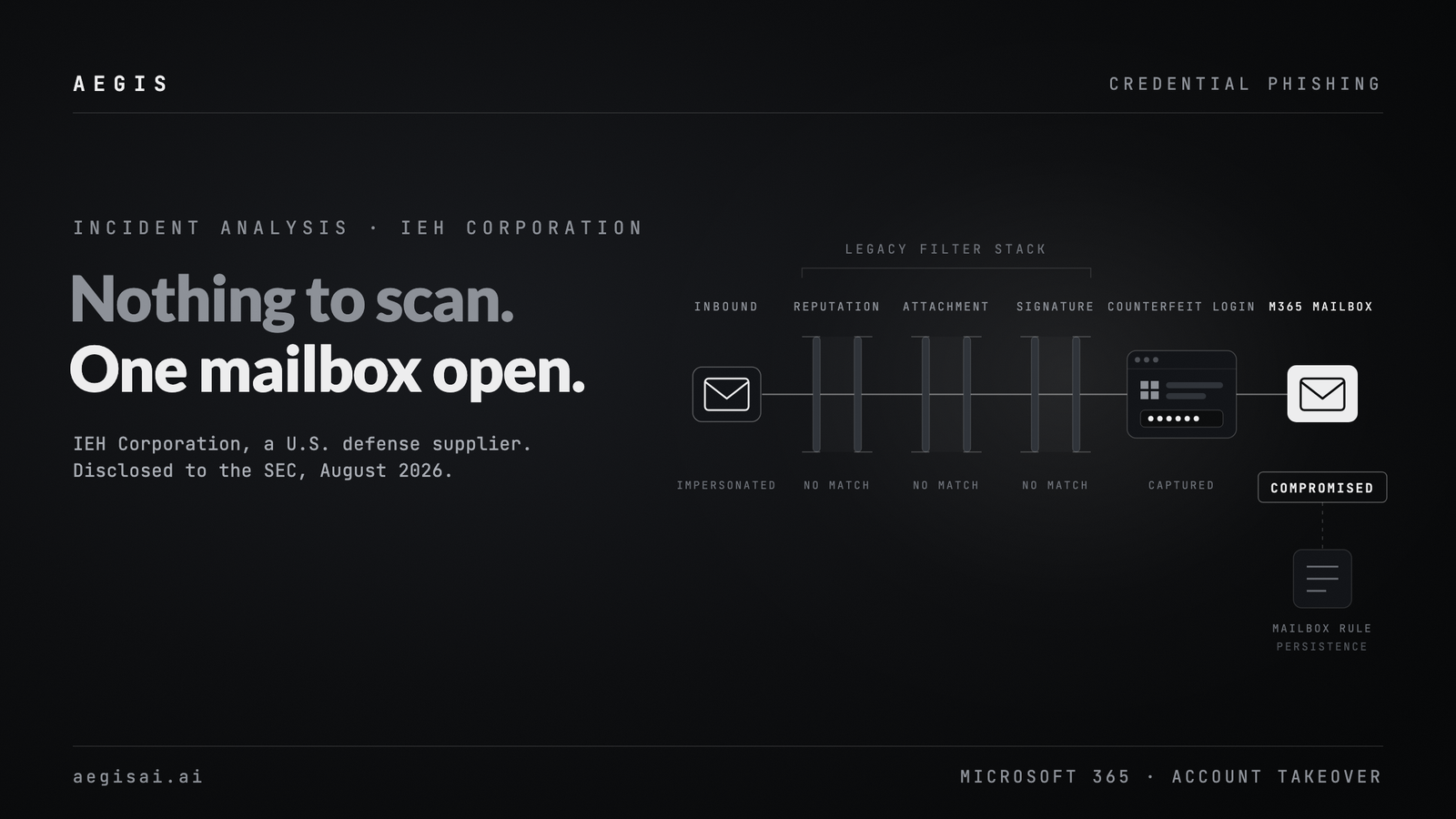
The email impersonated a business contact and linked to a fake Microsoft login page that captured the employee's credentials. There was no malware, no weaponized attachment, no previously flagged domain. Secure email gateways and signature-based tools are designed around known-bad artifacts: malicious files, blocklisted senders, reputation scores. This message presented none of them. It presented a plausible request from a plausible sender, and that was enough.
That is the structural problem with rule-based email security. It scans for the evidence of past attacks. Credential phishing that relies on impersonation and social engineering leaves no such evidence at the moment of delivery. More than 90% of cyber incidents begin with email, and the highest-cost ones increasingly look exactly like this: clean, targeted, and built to survive a filter that is looking for the wrong thing. This is the gap inbound email security has to close, and it is the same gap that shows up across Microsoft 365 and Google Workspace native controls.
A counterfeit login page is an adversary-in-the-middle problem, not a malware problem
Credential capture through a spoofed Microsoft sign-in page is the entry point for adversary-in-the-middle (AiTM) phishing. The victim types real credentials into a page the attacker controls. Modern phishing kits proxy that session to the genuine Microsoft endpoint in real time, which means a one-time passcode entered on the fake page can be relayed before it expires, and the resulting session token can be replayed. Push-based and SMS-based multi-factor authentication do not reliably stop this. Phishing-resistant MFA, meaning hardware security keys or passkeys bound to the real domain, does, because the credential will not release to a look-alike origin.
The practical consequence: treating this as a malware incident leads to the wrong controls. Attachment sandboxing and URL reputation add nothing against a page that is benign at scan time and malicious only inside a live victim session.
Email account takeover compounds when the mailbox is the crown jewel
IEH reported no evidence of data exfiltration, but the exposure alone carries regulatory weight. The company's products fall under the ITAR and EAR export-control regimes. Unauthorized foreign access to that technical data is not just a security incident, it is a potential federal violation, which is why the breach warranted an SEC disclosure.
A mailbox is rarely just messages. It is contracts, engineering files, financial approvals, and the trust relationships an attacker can pivot into next. That pivot is the second act of nearly every email account takeover: the compromised mailbox becomes the launch point for internal business email compromise against colleagues, suppliers, and customers who have no reason to doubt the sender. The attackers here also planted malicious mailbox rules, the standard move to keep quiet, persistent access after the initial compromise.
Stopping this attack means judging intent, not artifacts
An impersonation-based credential attack has to be evaluated on what it is asking for, not on what it is carrying. Does this sender relationship make sense given prior history? Is this a normal way for this contact to share a file? Does the destination behave like a legitimate Microsoft login flow, or like a proxy standing in for one?
Those are the questions a security analyst asks. Reasoning through them at the speed and volume of inbound email is where analyst-style systems, models that assess context and behavior rather than match signatures, change the outcome.
What to do this week
- Test your stack against a payload-free lure. Send an impersonation-style message with no attachment, no malware, and a clean-reputation domain pointing to a credential-harvesting page. If it lands untouched, that is your exposure.
- Alert on mailbox rule creation. Auto-forwarding and auto-delete rules are the persistence step that follows most account takeovers. Detection here shortens dwell time even when the initial email gets through.
- Enforce phishing-resistant MFA. Credential capture only converts to mailbox access when the second factor can be relayed or replayed. Hardware keys and passkeys break that chain.
- Map which mailboxes hold regulated data. For defense, healthcare, and financial suppliers, the compliance blast radius of a single mailbox is often larger than the security one.
If your controls only fire on known-bad artifacts, a clean phishing email is a clear path in. See how AegisAI reasons about intent on your own inbound mail.
Frequently asked questions
How does credential phishing get past Microsoft 365 email security?
It carries no detectable artifact. There is no attachment to sandbox, no malware signature to match, and the sending domain often has clean reputation. Controls built to identify known-bad files and senders have nothing to evaluate, so the message is delivered as legitimate.
What is an adversary-in-the-middle phishing attack?
The attacker hosts a proxy between the victim and the real login service. Credentials and one-time passcodes entered on the fake page are relayed to the genuine service in real time, and the returned session token is captured. This defeats MFA methods that rely on a code or a push approval.
How do you detect a Microsoft 365 mailbox compromise after credential theft?
Watch for new inbox rules, particularly auto-forward and auto-delete, plus sign-ins from unfamiliar locations or user agents, mass mailbox searches, and outbound mail to the user's contact list that the user did not send. Mailbox rule creation is the strongest early signal because it is the standard persistence step.
Sources

.png)