Aegis Threat Intelligence: Sharpening the Harpoon – Direct Send Abuse Still Fueling Modern Spearphishing
The call is coming from inside the house: How threat actors act as 'internal' users to bypass your security stack.
Written by
AegisAI Threat Intelligence
Published on
Executive Summary
Multiple threat actors are still actively abusing Microsoft 365's "Direct Send" feature to deliver phishing emails that appear to originate from legitimate internal users within target organizations. Our monitoring has identified 23 active malicious sending IPs involved in these campaigns. The attacks span a wide range of payloads — quishing (QR code phishing), malicious HTML, malicious SVGs, credential harvesting, and remote access trojans — with nearly half (48.3%) exhibiting targeted rather than mass-blast characteristics. All observed emails used custom domains as the sending infrastructure. This report details the Direct Send abuse vector, the scope of observed activity, and a deep-dive into one particularly sophisticated adversary-in-the-middle (AiTM) phishing kit recovered during investigation.
The Security Gap: Direct Send vs. Secure Email Gateways (SEG)
To understand the severity of this threat, one must first understand the standard defense architecture. Most organizations protect their users with a Secure Email Gateway. This perimeter security layer sits in front of Microsoft 365, filtering incoming traffic for malicious links, attachments, and spam before it reaches the inbox.
However, Direct Send is designed to bypass this flow. Because it connects directly to the Microsoft 365 infrastructure, it circumvents the email security gateway entirely, rendering traditional MX record filtering useless against these internal-to-internal spoofing attacks.
What Is Direct Send?
Direct Send is a method by which applications or devices send email to internal recipients within a Microsoft 365 tenant. It works by connecting directly to the tenant's publicly facing MX endpoint — typically <domain>.mail.protection.outlook.com on TCP port 25 — and delivering mail without any authentication. No username, password, OAuth token, or certificate is required. The MX endpoint address is deterministic from the domain name alone.
Microsoft documents three methods for sending email through Microsoft 365:
Method
Authentication
Port
Can Send Externally
SMTP Client Submission
Yes (OAuth/Basic)
587
Yes
SMTP Relay
Yes (connector + cert/IP)
25
Yes
Direct Send
None
25
No (internal only)
Why organizations still use it
Despite requiring zero authentication, Direct Send remains widely deployed because many operational systems cannot support modern auth. Common legitimate use cases include:
Multifunction printers/scanners that email scanned documents to internal recipients
Line-of-business applications generating automated alerts, appointment reminders, or workflow notifications
Legacy on-premises systems (e.g., ERP, ticketing, monitoring) that lack OAuth 2.0 support
Third-party SaaS platforms that deliver internal notifications without a dedicated mailbox
These dependencies make it difficult for organizations to simply disable Direct Send — making it an easy target for threat actors to target.
What Is Direct Send Abuse?
Direct Send abuse occurs when a threat actor exploits this unauthenticated pathway to execute Business Email Compromise (BEC) attacks, spoofing internal email addresses to deceive employees and deliver phishing content that appears to originate from within the target organization.
The attack requires only three pieces of information: the target's domain name (to derive the MX endpoint), a valid internal email address to impersonate, and a valid recipient address. No credentials or account compromise are needed. The attacker connects to <domain>.mail.protection.outlook.com:25, sets the MAIL FROM to any address within the organization's accepted domain, and delivers the message. Exchange Online processes it as anonymous inbound email and delivers it internally.
This is a known, low-effort vector. It can be automated with a single PowerShell Send-MailMessage command or a few lines of Python using smtplib — no -Credential parameter or server.login() call is needed. Once a valid recipient is known, the attack is trivially repeatable at scale.
Observed Campaign Activity
Scale and scope
Our monitoring has identified the following across active campaigns:
23 malicious sending IPs (see Appendix A)
48.3% of attacks were targeted (specific recipients, tailored lures) rather than mass phishing
All emails observed used non-major Email Service Providers (gmail, yahoo, etc) as sending infrastructure
Observed payload types
The campaigns employ a diverse range of payloads:
Quishing — QR codes in PDF attachments redirecting to credential harvesting pages
Malicious HTML attachments — self-contained phishing pages delivered as .htm/.html files
Malicious SVGs — scalable vector graphics containing embedded JavaScript or links to phishing infrastructure
Credential harvesting — links to spoofed login portals for Microsoft 365, Google, and other services
Remote Access Trojans (RATs) — payloads designed to establish persistent remote access
Case Study: Sophisticated AiTM Google Account Phishing Kit
During our investigation of Direct Send-facilitated phishing, we recovered one particularly sophisticated phishing kit that warrants detailed analysis. This kit targets Google Accounts and operates as a modular, single-page application (SPA) capable of bypassing multiple forms of two-factor authentication in real time.
Overview
The kit acts as a real-time adversary-in-the-middle (AiTM) proxy between the victim and legitimate Google login servers. It does not simply harvest static credentials — it synchronizes an interactive session with Google's authentication flow, allowing the attacker to complete login on behalf of the victim, including handling any MFA challenge Google presents.
The C2 infrastructure is hosted at hxxps[://]stackblitz[.]waidrufroo[.]ru.
Technique
ID
Observed Activity
Phishing: Spearphishing Link
T1566.002
Spoofed internal emails containing links to credential harvesting pages
Internal Spearphishing
T1534
Direct Send abuse mimics internal email origin, exploiting trust
Adversary-in-the-Middle
T1557
AiTM phishing kit proxies real-time session between victim and Google
Multi-Factor Authentication Interception
T1111
Real-time interception of MFA codes
Steal Web Session Cookie
T1539
AiTM proxy captures authenticated session cookies
Use Alternate Authentication Material: Web Session Cookie
T1550.004
Stolen session cookies used to access accounts post-compromise
Acquire Infrastructure: Web Services
T1583.006
Lures hosted on Google Cloud Storage and Adobe Acrobat
Trusted Relationship
T1199
Abuse of Microsoft 365 infrastructure and trusted cloud platforms
Masquerading
T1036
Pixel-perfect Google login replica; spoofed internal sender identities
Input Capture: Web Portal Capture
T1056.003
Credential and MFA code capture via fake login interface
Attack Flow
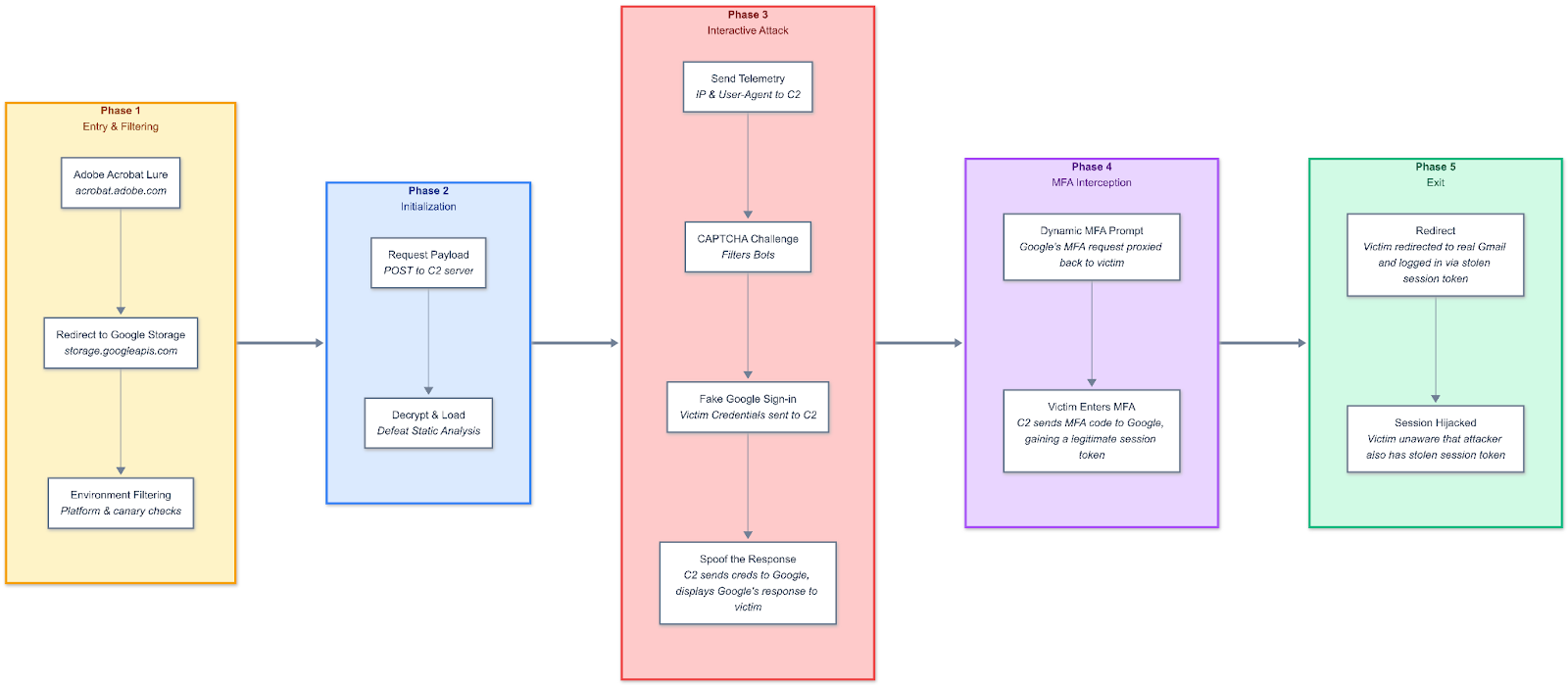
The attack proceeds through five distinct phases, driven by a payload that synchronizes the browser UI with C2 backend commands.
Phase 1: Entry and Filtering
The victim encounters a lure page hosted on Adobe Acrobat (acrobat.adobe.com) — a legitimate, trusted platform. The page mimics a shared document interface, displaying a red PDF icon with the message "You've received (3) new PDF Documents for your review" and a prominent "VIEW SECURE DOCUMENT" link.
Initial Adobe Acrobat lure page The lure is hosted on acrobat.adobe.com, lending it the full trust and visual branding of a legitimate Adobe product. The URL in the browser bar is a genuine Adobe domain. The victim sees what appears to be a standard document sharing notification.
"Open Web Page" confirmation dialog When the victim clicks the link, Adobe Acrobat displays a confirmation dialog: "Do you want to open this link: https://storage.googleapis.com/assorthealth/offline_attachment.html?" — The redirect target is on Google Cloud Storage, another trusted domain.
Clicking the link redirects to hxxps[://]storage[.]googleapis[.]com/assorthealth/offline_attachment[.]html. This page contains a reflective loader for the phishing kit.
The loader performs several filtering checks:
Platform check: If the user's platform fails validation, the page remains blank
Canary/kill switch: Probes hxxps[://]grey[.]teashaboulouve[.]qpon/dallal!twairyd — This prevents analysis in sandboxed environments that block this obscure domain
Failure redirect: If canary checks fail, the user is redirected to https://www.bigcartel.com — a benign e-commerce platform
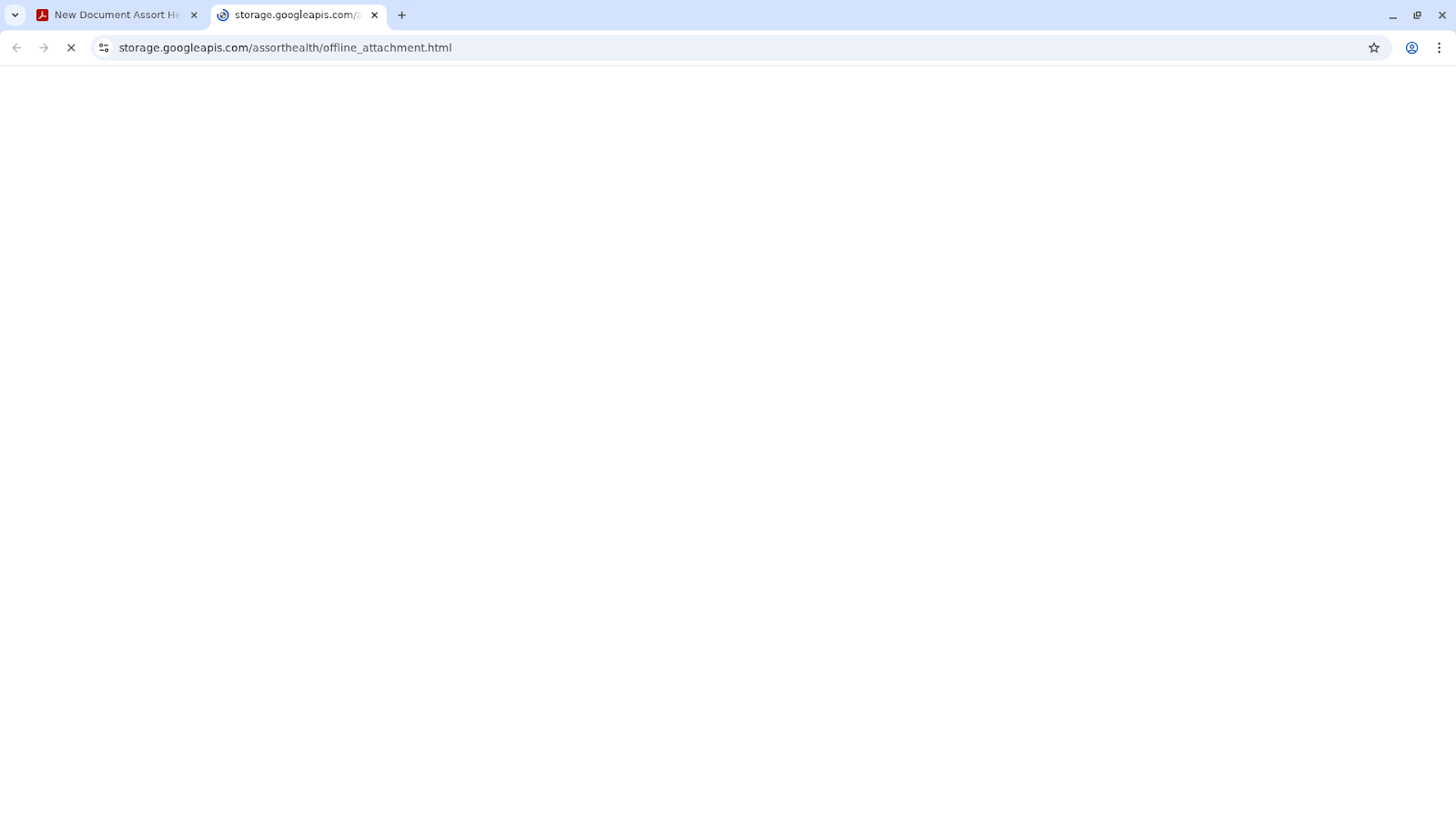
Blank page during loading The Google Storage bridge page initially renders blank while the loader script executes its environment checks and fetches the encrypted payload from the C2. The URL bar shows storage[.]googleapis[.]com/assorthealth/offline_attachment.html.
Phase 2: Initialization
The kit POSTs to hxxps[://]stackblitz[.]waidrufroo[.]ru/kfv4mqUo0oTtqn... to retrieve apayload.The payload uses a multi-layered encryption and obfuscation strategy that combines custom Shift-XOR stream ciphers with memory-only Base64/eval execution to prevent disk-based detection. It further secures the payload by employing server-side conditional delivery, ensuring core functions and keys are only transmitted if specific client-side criteria are met. This multi-layered mechanism ensures the core phishing logic is never present in the initial page load — defeating static analysis and preventing researchers who simply download the HTML from recovering the attack code.
Phase 3: Interactive Attack
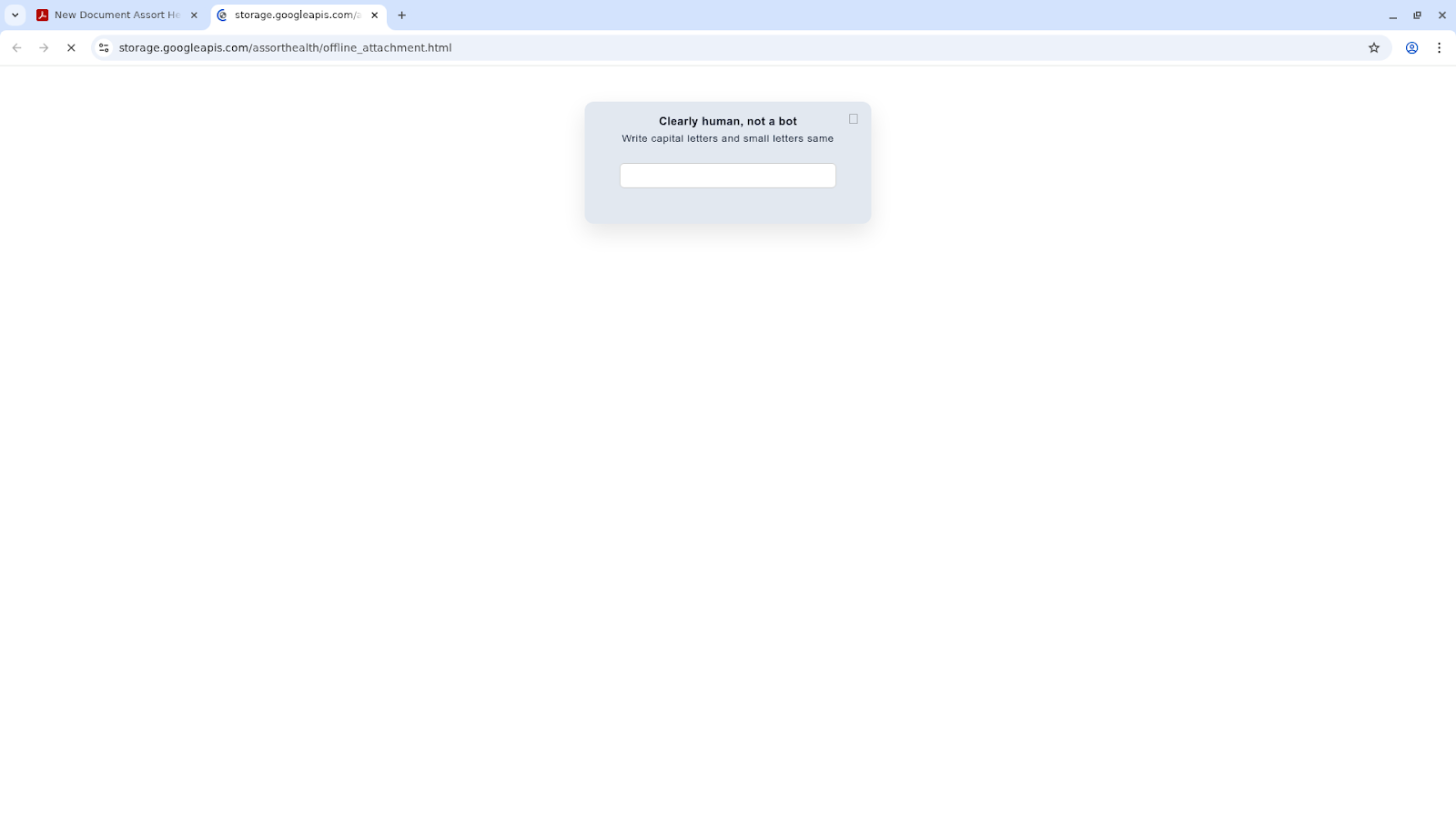
Once the payload is decrypted and loaded, it sends telemetry (IP, User-Agent) to the C2 via a pagevisited() call. The C2 may respond with a captcha show command, overlaying a textual/image CAPTCHA before displaying the login form. This validates humanity and filters automated analysis bots.
"Clearly human, not a bot" CAPTCHA The kit displays a custom CAPTCHA challenge: "Clearly human, not a bot — Write capital letters and small letters same." This is served by the C2, not by Google, and appears before the credential form.
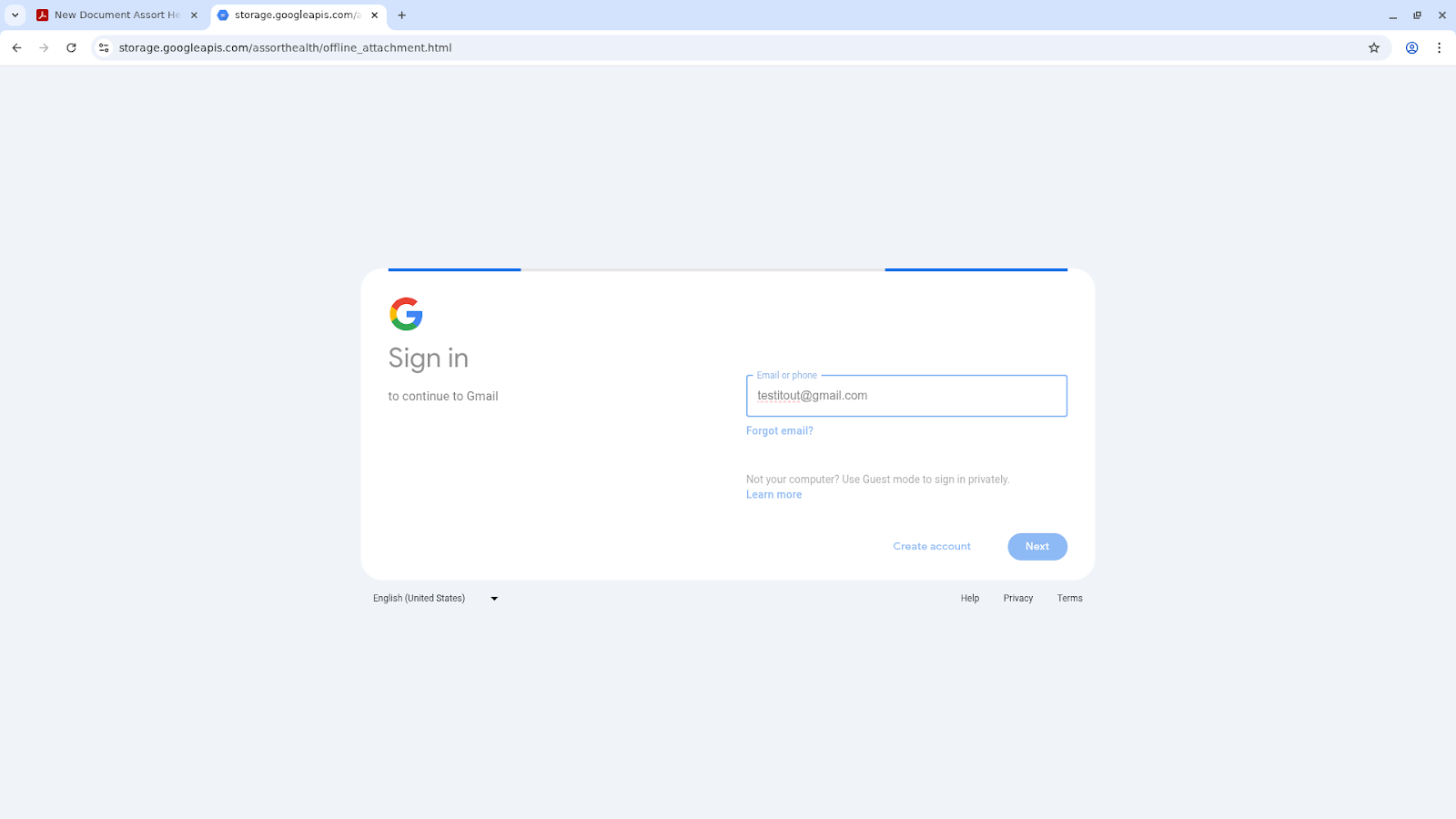
The victim then encounters a pixel-perfect replica of the Google Sign-in page, rendered entirely within the phishing kit's SPA. The URL bar still shows storage.googleapis.com — the only indicator that this is not the real Google login.
Google Sign-in replica — empty state The fake login page faithfully reproduces Google's "Sign in to continue to Gmail" interface, including the Google logo, "Email or phone" input field, "Forgot email?" link, "Not your computer?" text, "Create account" and "Next" buttons, and the language selector. Only the URL distinguishes it from the real page.
Google Sign-in replica — with email entered The victim has entered [email protected]. The interface responds identically to the real Google login flow.
After email entry, the client sends the data to the C2. After password entry, the data is sent again. The C2 attempts to login to Google in real time using the captured credentials.
Phase 4: MFA Interception (Dynamic)
Based on Google's response, the C2 instructs the kit to display the appropriate MFA challenge overlay — SMS code entry, authenticator app code entry, mobile device approval prompt, backup code entry, phone number verification, or voice call code entry. The victim enters the code, the client POSTs it to the C2, and the attacker completes the Google login session.
Phase 5: Exit
Upon receiving a success message from the C2, the kit redirects the victim to a dynamic URL provided by the server — typically mail.google.com — seamlessly handing off to the now-authenticated Gmail session.
"Loading Gmail..." transition After successful credential and MFA capture, the victim sees a Gmail loading screen (envelope icon with "Loading Gmail..." text) while the kit completes the handoff. The victim arrives at their real inbox, unaware their session has been hijacked.
Recommendations
In an ideal world: eliminate the attack surface
Evaluate and restrict Direct Send. Audit whether your organization actively uses Direct Send. If not, enable RejectDirectSend in Exchange Online: Set-OrganizationConfig -RejectDirectSend $true. If Direct Send is required for legitimate devices, create partner inbound connectors with IP or certificate-based authentication for authorized senders, then enable RejectDirectSend for all other traffic.
The reality: most organizations cannot simply turn Direct Send off
For many organizations, disabling Direct Send is not operationally viable. Legacy printers, ERP systems, monitoring platforms, and third-party integrations create hard dependencies that cannot be re-architected overnight — and in some cases, cannot be re-architected at all. Furthermore, when Direct Send traffic goes directly to the MX endpoint, it bypasses any third-party Secure Email Gateway sitting in front of Exchange Online entirely.
Meanwhile, the traditional email security gateway was not designed for this problem. Static blocklists cannot keep pace with 23+ rotating IPs across decentralized campaigns. Signature-based detection cannot catch a phishing kit that delivers its payload conditionally and encrypts its core logic with a custom stream cipher. Rule-based email filtering cannot distinguish a spoofed Direct Send message from a legitimate one when both arrive via the same MX endpoint with the same AuthAs: Anonymous header — the difference is intent, and intent requires understanding context, content, and behavioral signals simultaneously.
This is where the gap between legacy email security and the current threat landscape becomes most visible. The attacks documented in this report — dynamic AiTM proxies, multi-layered obfuscation, conditional payload delivery, real-time MFA interception — are adaptive, context-aware, and designed to defeat static analysis. Defending against them requires AI-powered email security that is equally adaptive: one that can reason about the semantic content of a message, evaluate behavioral anomalies in real time, and make decisions about novel threats it has never seen before — not just match patterns from threats it has seen in the past. Organizations that remain dependent on Direct Send should critically evaluate whether their current enterprise email security stack is capable of operating at the same level of sophistication as the threats now flowing through that channel.
Why Email Security False Positives Happen and How to Fix the Root Cause
Why signal-stacking email filters block legitimate mail, how to measure precision, recall and false-positive rate, and how reasoning-based detection cuts both error types at once.
How to Evaluate Email Security Vendors: A Practical Framework for Security Leaders
A buyer's framework for evaluating email security vendors: detection testing, false-positive verification, architecture, explainability, total cost, and a POV checklist.


.png)