Last updated: September 8, 2026
Evaluating email security means testing a product against your own mail traffic instead of its marketing claims: how much it catches, how much noise it adds, how clearly it explains each verdict, and how fast it deploys without touching mail flow. Done well, it produces a decision you can defend to your CFO and your board with data from your environment, not a vendor's demo tenant. This guide covers the six criteria, the proof-of-value method, and the questions that separate an evaluation from a sales pitch.
What does evaluating email security mean?
Evaluating email security is comparing solutions against a fixed set of criteria (detection efficacy, false-positive impact, architecture fit, explainability, deployment cost, and vendor trust) under identical, controlled conditions. It is different from measuring a program you already run, which tracks metrics like mean time to detect (MTTD) and mean time to respond (MTTR) over time. Evaluation happens before you sign. Measurement happens after.
Evaluation asks whether a product will cut your risk without burying your team in alerts. Measurement asks whether the product you bought still performs. Most buyers skip from vendor scorecards and reference calls straight to a signature without a structured test on their own mail. That is how a company ends up in a three-year contract with a tool that catches last year's phishing templates and lets half of the AI-generated ones through.
The six criteria that predict whether a product will work
Every vendor pitch collapses into six questions. Ask them in this order, because each one gates the next. A tool with strong detection and no explainability still hands your analysts a black-box alert they cannot act on.
| Criterion | Buyer question | Why it matters |
|---|
| Detection efficacy | Does it catch threats with no known-bad signature: zero-day phishing, adversary-in-the-middle (AiTM) kits, no-payload BEC? | Signature and reputation checks miss AI-generated attacks by design. |
| False-positive impact | How many legitimate emails get flagged per 1,000 processed, and what happens to them? | False positives drive alert fatigue and the rule-tuning workload. |
| Architecture fit | Does it sit inline at the MX record, or connect by API after delivery? | Decides what the tool can see: internal mail, tenant-to-tenant mail, links weaponized after delivery. |
| Explainability | Can an analyst read why a message was flagged, in plain language? | Black-box verdicts slow investigation and erode trust in the tool. |
| Deployment and operations | How long to go live, and how much rule-writing does it need afterward? | Time to value and tuning burden come straight out of team capacity. |
| Vendor trust | Is the vendor SOC 2 Type II certified, and how is email content stored and retained? | You are handing a third party access to every message in the company. |
SEG, ICES, or both? Architecture sets the ceiling on what you can test
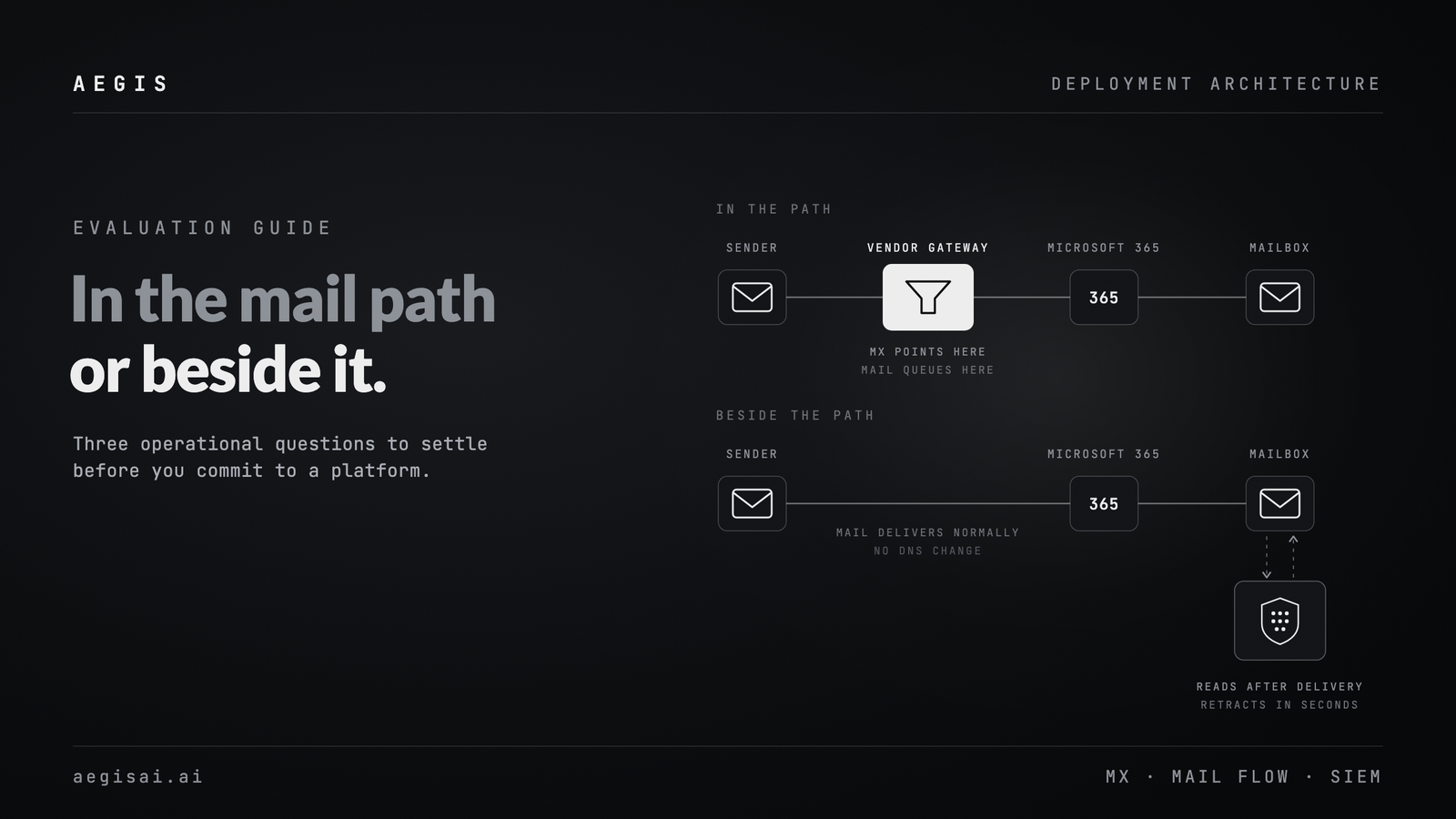
A secure email gateway (SEG) sits inline at the MX record and inspects mail in transit. An integrated cloud email security (ICES) platform connects by API to Microsoft 365 or Google Workspace and keeps evaluating messages after delivery, including ones already read or forwarded.
Settle this before you run a single test, because it decides what each tool can see. A SEG has no view of internal mail, of tenant-to-tenant traffic that never leaves the cloud provider's backbone, or of a link that turns malicious hours after delivery. An API platform sees all of that, plus context a gateway inspecting one message in isolation never gets: who the sender is to this recipient, what the thread has been about, and whether the request fits the conversation.
Neither architecture alone covers everything. Decide up front whether you are testing for perimeter blocking, post-delivery remediation, or both, and score each vendor against the layer it operates in. Comparing a SEG's block rate to an API tool's remediation count without normalizing for architecture produces a meaningless winner.
How to run a fair proof of value instead of a vendor demo
A vendor demo shows you their best day. A proof of value (POV) shows you your own mail traffic run through their detection. Structure it as a procedure, not a conversation.
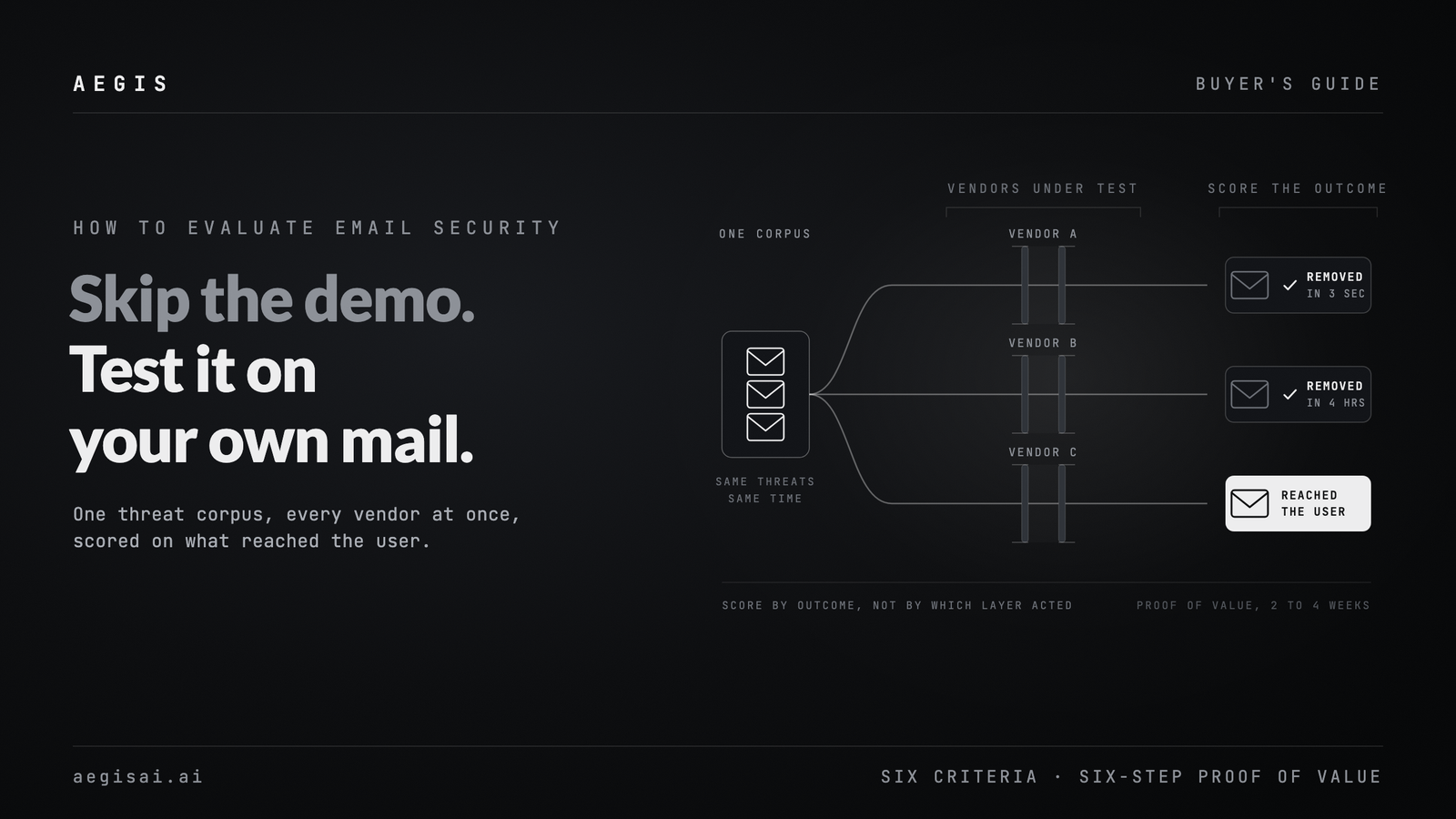
- Build one threat corpus, not per-vendor samples. Every product under test sees the same set of real and simulated malicious emails, credential phishing, BEC, malware, and no-payload social engineering, at the same time.
- Include threats with no known-bad signature. Newly registered domains, first-seen sender infrastructure, and clean BEC attempts with no link and no attachment. This is where legacy filters fail and where AI-native detection earns its price.
- Route mail identically. If one tool sees traffic at 3 AM and another at peak volume, the detection-speed comparison is worthless.
- Classify outcomes, not mechanisms. A SEG that blocks a threat before delivery and an API tool that removes the same threat seconds after delivery produced the same security outcome. Score on whether the user saw it and how fast it was removed, not on which layer acted.
- Track four numbers minimum: catch rate, false-positive rate, time to detect, and analyst workload per 1,000 messages. A high catch rate that triples alert volume is a loss.
- Let your own analysts run triage during the test. Vendor-run POVs show best-case investigation times. Your team's experience with the dashboard and the alert quality is the number that predicts life after purchase.
How to verify false-positive claims instead of trusting them
Every vendor claims a low false-positive rate. Few explain how they measured it. Ask for the denominator: false positives per 1,000 total messages, per 1,000 flagged messages, or per 1,000 high-severity alerts. The same data produces very different numbers under each one.
Then verify it during the POV. Pull a sample of everything the tool flagged and have your own team classify it independently. A tool tuned for an impressive catch rate will often over-flag borderline mail (invoice-adjacent language, unusual but legitimate vendor domains, internal automation) to avoid missing anything. That trade-off looks good in a sales deck and bad in your analysts' queue three weeks after go-live.
Ask each vendor to show you what a false positive from their system looks like and what happens to that email next. A tool that reasons about context and intent, weighing the sender, the request, and the language together, should be able to say why a flagged message looked suspicious, not only that a rule matched.
Why explainability should be pass or fail
A verdict with no reason attached slows every analyst who touches it. When a tool flags a message as BEC or phishing, the analyst needs the specific signals behind that call in plain terms: a sender who has never written to this recipient, a payment request that does not match the established process, a display name that does not match the sending domain. A numeric risk score with no supporting logic is not that.
This matters for three practical reasons. Investigation speed: an analyst who can read why a message was flagged closes it faster than one who has to re-investigate from scratch. Trust: teams stop acting on alerts from tools they cannot audit. Defensibility: when a board or auditor asks why an attack was or was not caught, "the model said so" does not survive the question.
During evaluation, open real flagged messages in the dashboard and read the reasoning yourself. If it reads like a black box in the POV, it will operate like one in production.
What to ask about deployment, integration, and time to value
Deployment friction is an evaluation criterion. Ask specifically:
- Does onboarding require MX record changes, or does it connect by API without touching mail flow?
- What is the time from contract signature to live detection: minutes, days, or weeks?
- How much rule-writing or policy tuning does the tool need after go-live?
- Does the platform work the same way on Microsoft 365 and Google Workspace, or does one get second-class support?
API-based deployment with no MX change means the tool can go live in minutes, versus the multi-week mail-flow migration an inline gateway usually requires. Every week spent on deployment is a week your existing gaps stay open.
Evaluating the vendor itself: trust, data handling, and compliance
You are granting a third party access to the contents of every email in your organization. That deserves the same scrutiny as the detection numbers.
Ask for the vendor's SOC 2 Type II report, not the badge on the website. Ask what email content is stored, for how long, and whether full message bodies are kept beyond what analysis needs. Ask how data is encrypted in transit and at rest, and whether the vendor's own infrastructure has been part of a disclosed incident. A vendor confident in its posture answers directly. One that retreats to "enterprise-grade security" language has given you a finding.
What it costs to run, beyond the license fee
License cost is the visible number. The rest sits in three places buyers underestimate during evaluation: analyst hours spent triaging false positives, engineering time spent on integration and rule maintenance, and the cost of the threats a legacy tool's blind spots let through. A product that costs more per seat but removes manual tuning and cuts false-positive triage can carry a lower total cost of ownership than a cheaper tool that generates constant noise.
Ask each vendor to estimate the analyst hours their tool will need per month at your message volume, and hold them to that number during the POV.
A buyer's evaluation checklist
- Built a single threat corpus and tested every vendor against it at the same time
- Included zero-day, no-payload, and AiTM samples, not only known commodity phishing
- Normalized results by outcome (reached the user or not, time to remove) rather than by mechanism
- Verified false-positive claims against a sampled, manually reviewed set
- Confirmed the tool explains its verdicts in language an analyst can act on
- Timed deployment from contract to live detection
- Requested the SOC 2 Type II report and the data retention policy in writing
- Estimated ongoing analyst hours after deployment, not only at launch
- Checked for VIP and role-based visibility on high-risk accounts (finance, executives)
- Confirmed coverage across Microsoft 365 and Google Workspace if you run either
How to keep measuring after you sign
Evaluation does not end at signature. Once deployed, track MTTD and MTTR together. A widening gap between the two, where response time grows while detection stays flat, is an early sign of analyst burnout or a broken escalation path. Track false-positive and false-negative rates separately by threat category, since a 2% miss rate on BEC carries far more financial risk than the same rate on graymail. Re-run your original POV criteria every two quarters to confirm the vendor's production performance still matches what you tested.
This is how AegisAI is built to be evaluated. Our agents reason about the sender, the request, and the context of each message the way an analyst would, from the first day of deployment and without a behavioral baseline to train, which is how customers see 90% fewer false positives than legacy filters. Deployment connects by API to Microsoft 365 and Google Workspace with no MX change and goes live in minutes. Every verdict ships with its reasoning in plain language, and VIP and role-based threat visibility shows which executives and high-value targets are being hit. We are SOC 2 Type II certified and never store full email content beyond what analysis requires.
Frequently asked questions
What is the difference between evaluating email security and measuring it? Evaluation is the pre-purchase test of products against fixed criteria under controlled, side-by-side conditions. Measurement is the ongoing tracking of a deployed program (MTTD, MTTR, false-positive rates) over time. Evaluation informs the buying decision. Measurement proves it was right.
How long should a proof of value take? Long enough to see performance across varied threat types and normal business volume: usually two to four weeks with a real threat corpus, not a single afternoon demo. Shorter tests reflect vendor-curated best cases rather than sustained performance.
Do I need both a SEG and an API-based tool? Often, at least during a transition. A SEG handles bulk spam and known-bad signatures at the perimeter. An API platform catches what gets through, including internal and tenant-to-tenant threats a gateway cannot see. Evaluate each for the layer it operates in.
What is a reasonable false-positive target? There is no universal number. It depends on message volume and severity tiers. What matters during evaluation is checking the vendor's claimed rate against your own sampled review instead of accepting a marketing figure.
Next steps
Run the checklist above against your current stack before your next renewal, and require every vendor in your evaluation to prove their claims on your own mail traffic, not a lab sample. To see how AegisAI's agents reason through real threats in your environment, book a demo.